












As enterprises move AI agents from pilot projects into daily operations, the model provider’s invoice is usually the first number to land on a budget owner’s desk. That bill covers only part of the cost of getting work done. Rising token volume also says little about the value the business receives.
In production, a single agent task might route across multiple models, query internal knowledge bases, call paid external APIs, retry failed steps, and pause for human approval. Two agents with identical token consumption can therefore carry very different operating costs and deliver completely different business results.
To make sound funding decisions, decision-makers need to see the actual work behind that consumption. Dify brings agent and workflow orchestration into the same environment as usage monitoring and execution records. Instead of waiting for engineering teams to stitch together scattered logs when costs spike, teams can inspect high-usage or failed runs in context, pinpoint the exact steps responsible, and adjust the underlying models, prompts, or workflows directly.
That visibility helps organizations answer the core investment question for every deployment: What does this agent cost to run, what verified result does it produce, and does it deserve continued funding?
Answering that question requires connecting resource usage, ownership, output quality, and business outcomes. This makes AI agent cost monitoring a core discipline of an AI agent management platform.
1. What an AI agent actually costs
If an organization only tracks prompt and completion tokens, much of an agent’s operational footprint stays hidden. An agent’s true cost follows the entire workflow required to finish a job, including the extra work triggered when an execution goes wrong.
For enterprise budget planning, a complete cost view covers six areas:
- Models: Input and output tokens across every model call in a run, including task routing, multi-step reasoning, fallbacks, and LLM-assisted evaluation steps.
- Knowledge and retrieval: Document parsing, indexing, vector storage, retrieval queries, and iterative patterns such as Agentic RAG, where an agent rewrites queries and evaluates evidence across multiple steps to improve accuracy.
- Tools and APIs: Paid third-party searches, CRM updates, order lookups, payment services, and sandboxed code execution.
- Infrastructure and runtime: Platform subscriptions, compute resources, databases, log retention, and external tracing.
- Retries and failures: Repeated model or tool calls, timeouts, abandoned runs, and error-recovery paths.
- Evaluation and human review: Quality checks, policy approvals, escalations, and the employee time spent fixing unusable outputs.
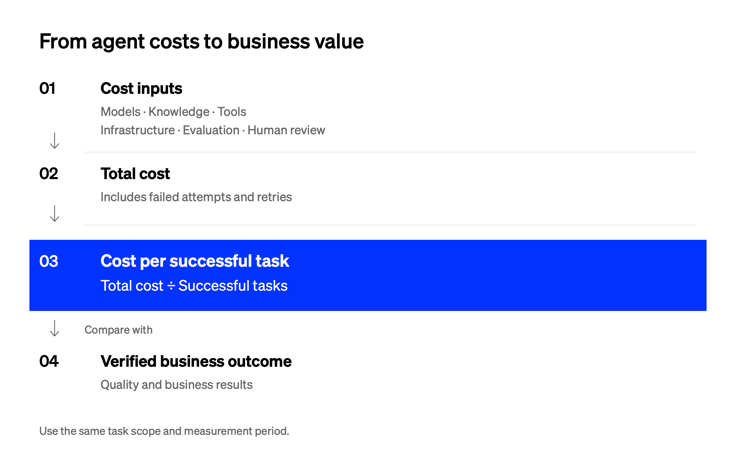
Comparing total task costs, including retries and human review, with verified business outcomes for the same task scope.
Looking at the full cost structure changes what “cheaper” means in budget reviews. Switching to a lower-priced model looks like an easy win on a unit-price spreadsheet. In production, however, if that cheaper model triggers repeated retries, passes bad parameters to APIs, or forces employees to manually rewrite outputs, your total cost per completed task actually goes up.
Spotting that hidden overhead requires looking past the monthly invoice to see how an agent executes each step. Dify brings token usage and estimated model costs together with execution records for model calls, knowledge retrieval, and tools. Teams can use those records to investigate whether a lower-priced model is creating more retries or review work, then compare the full cost of completing the task.
2. Attribute spend to workflows and owners
A consolidated vendor bill tells finance how much the company spent on AI last month. It tells IT and business leaders almost nothing about which initiatives to scale and which to shut down.
That blind spot grows quickly as adoption scales. When Japanese tech company Kakaku.com rolled out Dify Enterprise, 75% of employees built nearly 950 internal applications across the organization. At that scale, a single company-wide token bill is unmanageable; keeping cost tracking clear requires separating workspaces, sandbox experimentation, and departmental applications from day one.
Across any growing enterprise, useful cost attribution connects consumption to four questions:
- Application and workflow: Which application generated the usage, and which workflows called a shared agent?
- Business owner and task: Which department owns the outcome, and what category of work (such as lead qualification, compliance review, or order triage) is consuming the budget?
- Environment and change history: Did a cost spike come from growing production demand, sandbox testing, or a recent update to a prompt or workflow version?
- Dependencies and execution status: Which models and external tools were invoked, and did the execution finish as intended?
Consistent identifiers bridge the gap between raw API bills and business ownership. Through Dify’s application analytics and execution logs, teams can trace consumption down to individual runs, user sessions, and workflow steps. They can inspect inputs, outputs, latency, and errors in the same place.
When teams build a reusable agent in Dify and invoke it across several workflows, Dify Agent Monitoring breaks down activity, token usage, estimated model costs, and feedback signals by source. Maintainers and budget owners can see which workflow is driving a shared agent’s consumption before changing its configuration, and can also pair Dify with infrastructure tools like TrueFoundry’s AI Gateway when they need gateway-level budget alerts across model providers.
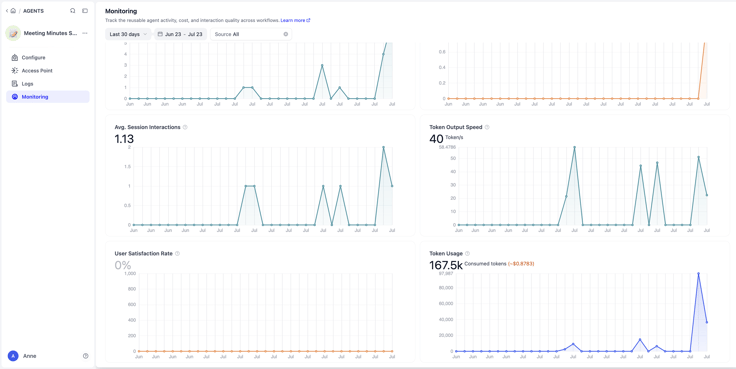
Dify Agent Monitoring tracks activity, token usage, estimated model costs, and feedback signals across the workflows that invoke a shared agent. These signals help teams decide where to investigate. Image from Introducing New Dify Agent.
3. Measure cost per successful task
Effective AI agent cost monitoring requires looking past cost per run. While helpful for spotting sudden changes in average resource consumption, cost per run has a critical flaw for decision-makers: a workflow can be marked as successful while still producing an inaccurate or unusable answer.
A far more reliable operational measure is cost per successful task:
Cost per successful task = Total cost of all attempts ÷ Number of successful tasks
Here, the numerator includes the cost of every attempt within a defined task cohort, including failed runs, retries, and required human review. The denominator counts only the tasks that meet an agreed business standard, such as an approved financial entry or a resolved support ticket.
Most organizations struggle to calculate this metric because a model provider’s invoice only reports raw token totals. It has no record of which tokens belonged to a failed retry, which runs required human intervention, or which executions actually solved a business problem.
Calculating outcome-based metrics becomes practical when your orchestration platform captures both resource consumption and review signals for every execution. Dify records token usage, estimated model costs, latency, and status at the individual run and message level, alongside user and operator feedback. Teams can pass business identifiers (such as a ticket ID or transaction ID) into Dify workflows and use the Human Input node to pause execution and record human approval or rejection decisions directly inside the run log. Joining those Dify records with verified outcomes from a CRM, ERP, or ticketing system gives budget owners the exact inputs needed to track six decision-ready metrics:
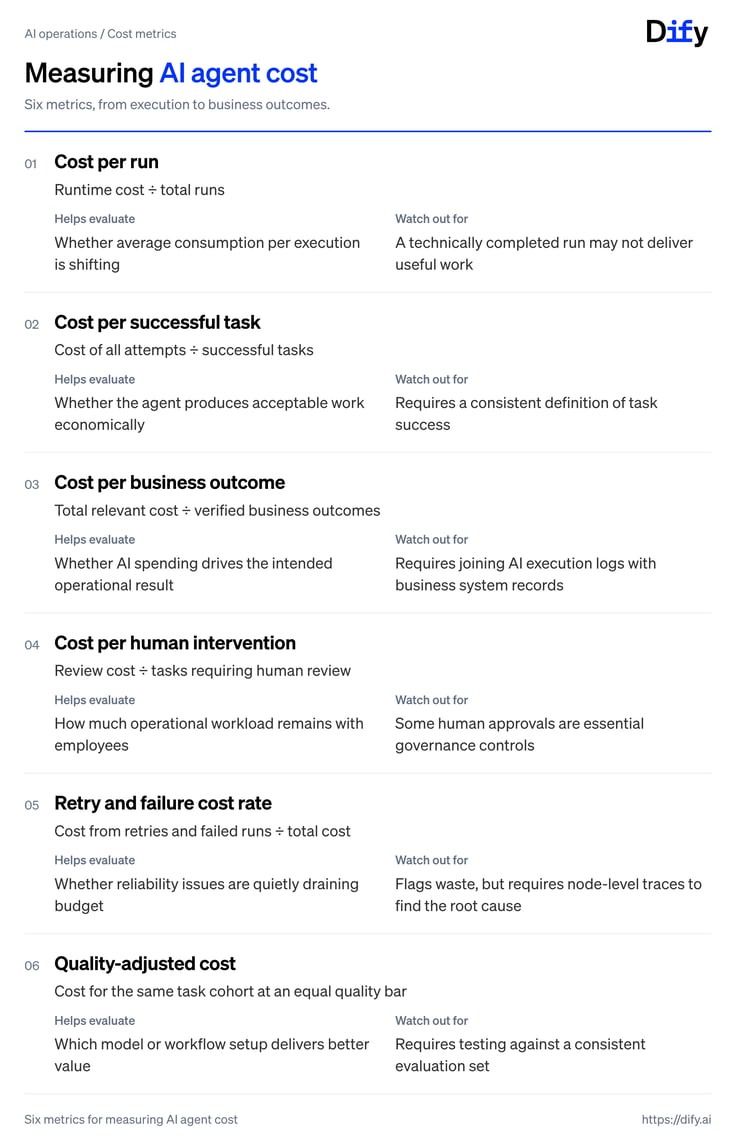
When comparing configurations, always match the same task cohort, time period, and cost scope. For example, if your initial analysis pairs Dify’s recorded model-cost estimates with verified ticket resolutions before adding infrastructure or labor overhead, label it estimated model cost per successful task. Clear scoping prevents teams from celebrating a "cost reduction" that simply shifted work from model tokens onto human reviewers.
4. From cost visibility to business value
High activity on an AI dashboard may indicate healthy adoption. It can also reflect repeated attempts to get a usable answer.
To avoid confusing activity with ROI, organizations need to connect three levels of evidence:
- System activity: What the platform executed (runs, messages, tokens, tool calls, and latency).
- Task outcomes: Whether the work met quality and policy standards (accurate retrieval, valid tool execution, and usable output).
- Business outcomes: What improved for the organization (faster turnaround, higher processing capacity, or lower cost per service delivered).
Examples from finance operations and customer support show how these three levels connect in practice.
Example 1: Finance automation
Consider how Dify’s own finance and engineering teams automated corporate card reconciliation in Finance Automation in Action, connecting Mercury card transactions to QuickBooks bookkeeping. You do not need to run this specific finance workflow to benefit from Dify, but it illustrates how the three levels of evidence align:
- System activity (Tracked in Dify): Each card transaction triggers a Dify workflow run that pulls transaction details, invokes an LLM node to suggest account classifications, and logs token usage and execution speed.
- Task outcome (Governed via Dify routing and traces): In financial bookkeeping, an unverified AI guess is unacceptable. The workflow uses rule-based controls to post high-confidence, recurring transactions directly to QuickBooks, while routing roughly 15% of transactions, including those involving new vendors or large amounts, to finance staff for exception review. Dify’s execution traces keep every classification basis auditable.
- Business outcome (Measured in finance operations): Because 85% of routine entries pass through accurately and exceptions are isolated for review, processing time per transaction dropped from 3 to 5 minutes to under 5 seconds, freeing finance specialists from manual data entry without sacrificing audit control. (Dify’s support team uses a similar pattern in its intent-based email-routing workflow, where automating roughly 85% of incoming email triage lets specialists focus on complex customer exceptions.)
Example 2: Customer refund agent
The same logic applies when evaluating customer-facing agents. Consider a support agent that reads an order, checks refund policy in a knowledge base, calls order and payment APIs, and initiates eligible refunds.
Here, a short conversation with low token usage is still a failure if the agent approves an out-of-policy refund or leaves the customer’s issue unresolved. For management, a successfully resolved request requires four verified conditions:
- The customer’s issue was accurately resolved.
- The decision followed company policy and captured any required manager approval.
- No duplicate refund occurred.
- The customer did not reopen the ticket within the observation window.
Teams can build and govern this flow in Dify by combining knowledge retrieval, API tools, and the Human Input node to pause high-value refunds for manager approval. Pairing Dify’s execution traces and recorded model costs with resolution status from the order and ticketing systems allows budget owners to track the cost per successfully resolved request.
When human interventions increase, teams can inspect Dify’s traces to check whether policy retrieval needs improvement. This helps them address the cause while retaining approvals that prevent refund errors.
5. Guide portfolio decisions with Dify
Once consumption data is linked to verified business outcomes, governing an enterprise agent portfolio becomes an evidence-based discipline. Decision-makers can review active deployments and make four targeted moves:
- Scale or expand when an agent consistently delivers verified outcomes at a sustainable unit cost.
- Optimize and improve when useful results are being dragged down by retries, slow tools, oversized context windows, or an over-provisioned model.
- Restrict scope when an agent performs economically on standard tasks but becomes unreliable and expensive on edge cases that should go straight to specialists.
- Consolidate or retire when multiple departmental agents duplicate the same capability or no longer justify their maintenance overhead.
This is where an AI agent management platform goes beyond a standalone token dashboard. Agentic FinOps connects usage visibility, contextual attribution, human review, and ongoing optimization to support financial accountability.
No single dashboard can calculate full enterprise ROI in isolation, because agent execution happens in your AI platform while verified business results live in your CRM, ERP, or ticketing systems, and final charges sit on your vendor invoices. Dify provides the operational engine that connects those records and lets teams act immediately on what they find:
- Inspect consumption in context: Track token usage, recorded model-cost estimates, latency, and feedback across individual applications and shared agents.
- Isolate waste and failures fast: Drill down from usage trends into conversation logs and workflow node traces (including nested workflows) to see exactly which step caused a retry, error, or rejected output.
- Fix and verify in the same workspace: Instead of handing off troubleshooting tickets between disconnected monitoring and development tools, teams can adjust models, prompts, knowledge retrieval, tools, or human approval nodes directly in Dify. Using version control, built-in knowledge base retrieval evaluation, or observability integrations such as Langfuse, Opik, and Arize, teams can verify that a configuration change lowers cost without degrading quality. (For concrete technical levers to cut waste once you spot the bottleneck, see how to reduce AI costs without losing control of your stack.)
This evidence supports AI agent lifecycle management alongside risk and business criticality. It gives IT and business leaders a clearer basis for deciding which investments to scale, refine, or stop.
Explore Dify to build, monitor, and optimize AI agents. Use execution data alongside business outcomes to decide where to invest next.
関連記事
- Research
The Guide to AI Agent Management Platforms
Learn what AI agent management platforms do, why enterprises need them, and how to evaluate their governance, monitoring, cost, and lifecycle capabilities.

 Anne Zhu & Zhenan Sun
- Research
Trust Is a Feature: How Dify Is Governing a Growing Plugin Ecosystem
Security, transparency, maintenance, and the systems behind a marketplace people can rely on.
 Li
- Research
How to Reduce AI Costs Without Losing Control of Your Stack
AI cost optimization requires visibility, governance, and reusable workflows to reduce spend without losing control.
Anne Zhu - Research
Build AI Applications, Not Platform Underneath: A Guide for IT Leaders
Here's how to build internal AI applications that reach production and survive the real world, without building the platform underneath them from scratch.
 Dify