











Not every task needs an agent.
If you just need to solve a one-off task, a regular AI chat may be all you need. If a process follows known steps and rules, workflow automation is often the better fit. An agent becomes useful when work recurs, requires judgment, and has a clear outcome you can evaluate.
The strongest use cases do not leave everything to the model. They pair its flexibility with a defined workflow, quality checks, and human oversight. For centralized IT and AI platform teams, choosing the right approach shapes how easy the solution is to explain, test, maintain, and trust when other teams depend on it.
AI Agent vs. Workflow: What's the Difference?
An AI agent is an application in which a model can interpret a goal, choose from available tools or actions, and continue based on the results. The model has discretion or guidelines over how to reach the requested outcome.
A workflow follows steps designed in advance. It can still use AI for tasks such as classifying a request, extracting information, or drafting a response, but the application owner defines the sequence and conditions.
The distinction is not whether an application uses AI. Both can. The distinction is who decides the next step: the workflow builder or the model at runtime.
| Approach | Who determines the steps? | Good fit when | Main design concern |
| AI agent | The model selects from approved tools or actions in response to context | The route varies by request and cannot be fully specified ahead of time | Limit choices, permissions, and pausing conditions |
| Workflow | The builder defines the sequence, logic, and branches | The process is repeatable and its rules are known | Make exceptions and failure paths explicit |
| Hybrid | The workflow sets boundaries; an agent becomes a part of the workflow and handles a specific variable step | Most of the process is predictable, with one part requiring flexible tool choice | Keep the agent's role narrow and observable |
Use Case: Handling an Employee IT Request
Suppose an employee reports that they cannot access a business application. The IT team wants to identify the issue, find relevant guidance, and prepare the next step.
| Option | In this example | Who controls the process |
| AI agent | The employee describes the issue. The agent can search approved documentations, ask a clarifying question, and choose whether to suggest a known fix or prepare a ticket. | The model chooses among the permitted tools and next actions based on the request and its skills, and context. |
| Workflow | The employee completes a form. The application checks required fields, classifies the request, retrieves the matching help article, and either returns instructions or prepares a ticket using defined branches. | The team designs the steps and conditions before the application runs. |
| Agent node in a workflow | The workflow first validates the request and retrieves relevant context. An agent node then decides which approved diagnostic tool to use and returns a summary. The workflow checks that result, asks for human review if needed, and routes or creates the ticket. | The model chooses actions inside the Agent node; the surrounding nodes controls what happens before and after it. |
This third pattern is useful when most of the process is predictable, but one step needs human judgement.
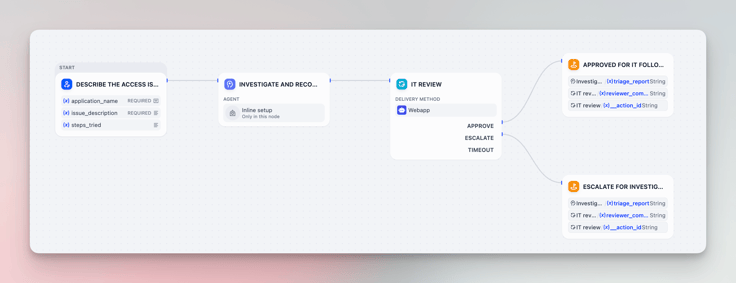
In Dify, teams can build an agent for a standalone app, or bring this agent as an agent node inside a workflow. This way, teams can keep a shared agent capability while defining a focused task and downstream checks in each workflow. Learn more about Dify agent here.
When to use an AI Agent, Workflow, or Both
In Dify, build an agent for recurring work with a clear goal when the agent needs to interpret each request and choose its next step. Give it context and a limited set of approved tools, then decide how people will review its results and handle mistakes.
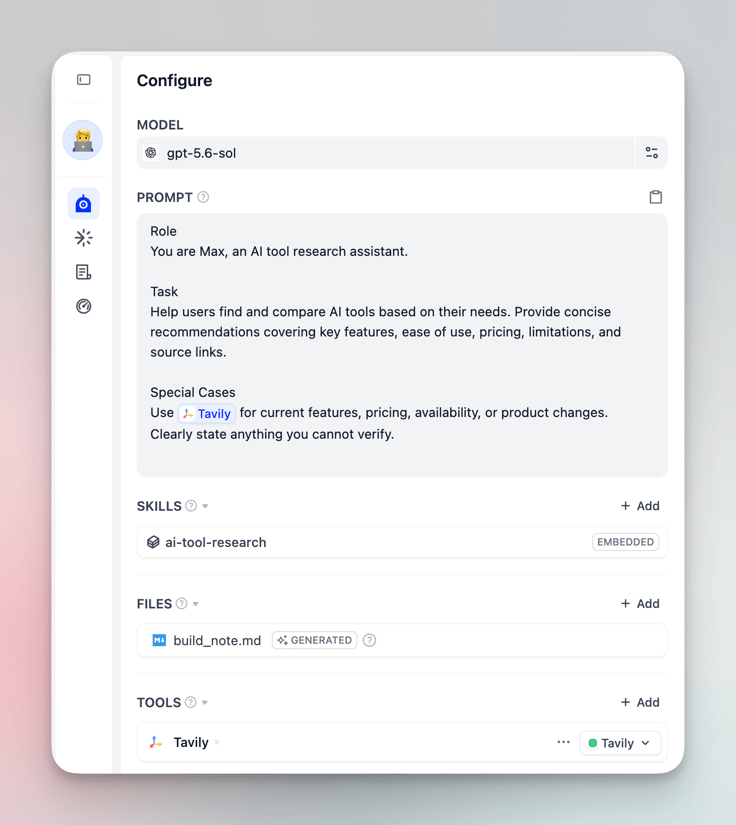
Build a workflow when the process follows an SOP with fixed steps and decision points. The workflow makes that sequence explicit. In Dify, you can use different nodes to handle different tasks such as classifying a request, extracting details, or drafting a response.

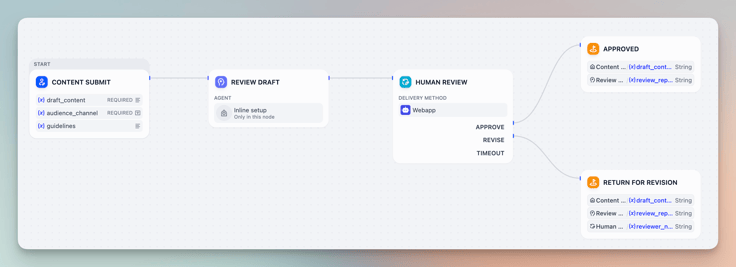
Add an agent node to a workflow when an SOP is mostly fixed but one step needs human involved. The workflow runs the surrounding steps and defines how to check, review, or route the agent's result.
A Brief Checklist for IT and AI Platform Teams
Before you build, align with the team that will use the application on four points:
- Outcome: What does a good result look like?
- Boundaries and authentication: Who can use the application, how users are authenticated, which tools and data each user can access, and which actions require approval?
- Quality: How will you test results, errors, and escalations?
- Ownership: Who maintains the application and its knowledge after launch?
Test an Agent before Scaling
Start with a small test set: include unclear requests, conflicting information, unavailable tools, and out-of-scope tasks.
Track the measure that matters, such as task completion, resolution time, correct escalation, or how much human correction is needed. Record failures as well as successes.
Keep early actions low-risk. Have the agent recommend or draft first, then expand its permissions as results prove reliable.
Build Agents and Workflows in Dify
Dify lets teams build AI appellations, agents and workflows. Build an agent with Dify when the model needs to select tools or actions. Choose a workflow for a fixed process, or add an agent node to a workflow when one step needs more flexibility and the rest should stay defined.
That choice lets IT keep the application logic visible and give teams a clearer way to understand how their AI application works. The platform supports the build-and-improve cycle; your team remains responsible for selecting the use case, setting permissions, testing behavior, and operating the application.
For a first project, choose one contained task, build the smallest useful version, and test it with realistic inputs before sharing it more widely. If the task needs flexible tool selection, try Dify's agent feature. If its steps are known, build a workflow in Dify.
Start building in Dify Cloud and choose the approach that fits the task: an agent for bounded, context-dependent actions, or a workflow for repeatable steps and explicit control.
Related articles
- How to
How to Create an AI Shopping Agent that Boosts Your Ecommerce Store
From catalog scraper and personalized recommendations to qualified lead capture, learn how to build an AI agent for your online store with Dify.
 Alex
Alex - How to
I Patched Calendly with New Agent
Use an Agent to make the software you already rely on work the way you work without rebuilding the whole thing.
Alex - How to
How to Build Your First Agent in Dify
Learn how to build an agent in Dify without coding or learning all the technical details. Create an agent, customize it through chatting, and use it as a standalone app or add it to the workflow.
 Anne Zhu
 - How to
How to Let Your Agent Call Dify Workflows Directly
Learn how to quickly invoke existing Dify apps, turning complex business workflows into a single prompt and one human approval.
 Zhenan Sun