











AI agent lifecycle management is the process of overseeing an agent from the first idea through building, testing, deployment, ongoing improvement, and retirement. It covers more than whether the agent works at launch. Teams also need to know what it can access, how well it handles real tasks, who is responsible for it, and whether changes to its model, instructions, knowledge, or tools affect its behavior.
What does the AI agent lifecycle include?
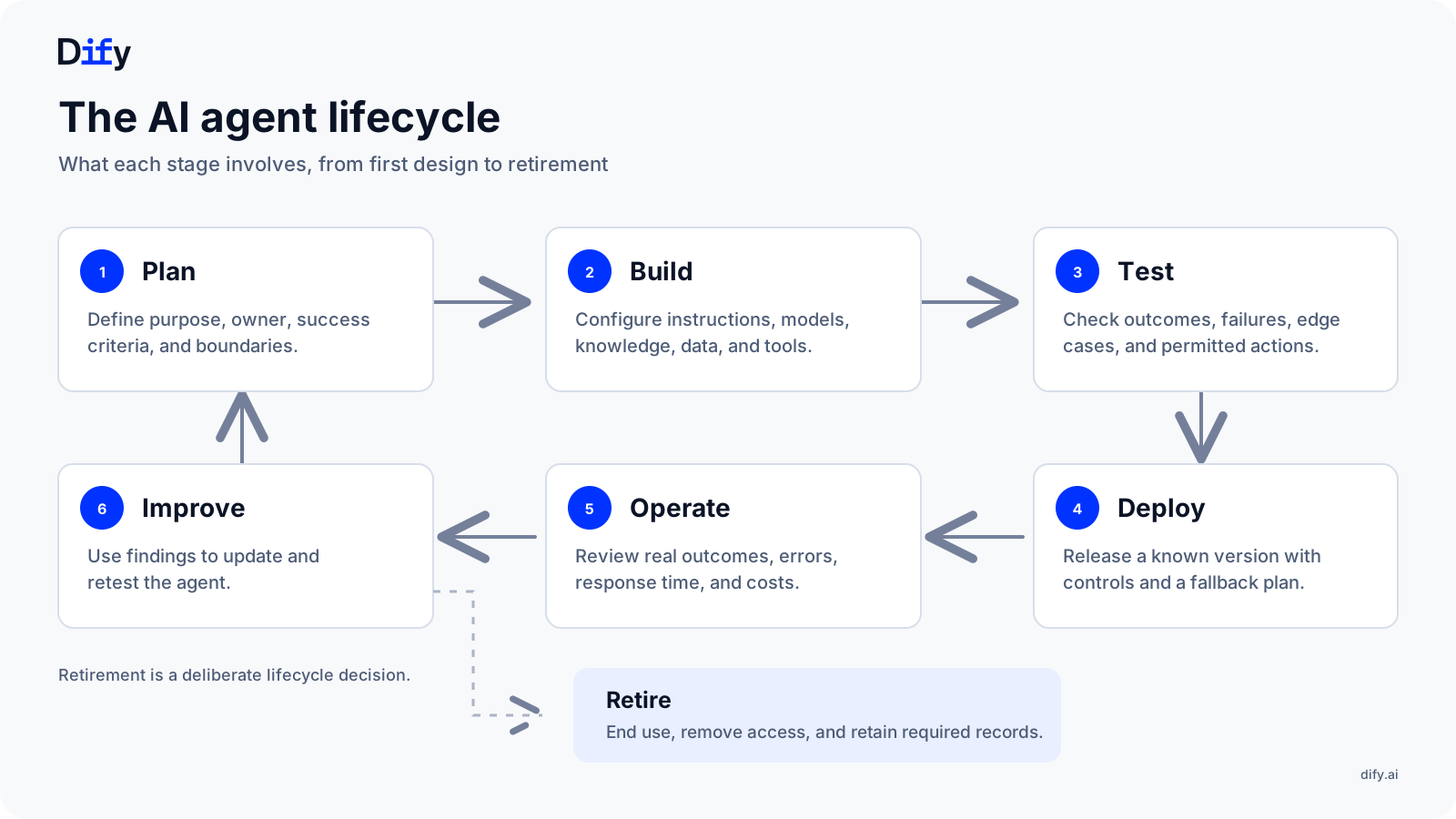
An agent's lifecycle starts with deciding what job it should do and what actions it may take. The team then builds and tests it, releases it for use, and reviews how it performs with real requests. What they learn may lead to a change in its instructions, knowledge, tools, or scope and another round of testing. Eventually, the team may replace or retire the agent.
What are the challenges of AI agent lifecycle management?
Changing behavior.
A support agent may work well in testing, then struggle when a refund policy changes or a connected tool returns different information. Teams need to review real requests and retest changes before releasing an update.
Hard-to-judge outcomes.
An agent can finish a run without an error and still give a poor answer or take an unhelpful step. Technical logs matter, but teams also need to check whether the result served the user.
Unclear ownership.
The people who built an agent may move to other work while it remains live. Without a named owner, problems can go unresolved and decisions to improve, restrict, or retire the agent can stall.
Different levels of risk.
An agent that drafts replies needs a lighter review than one that changes orders or issues refunds. Oversight should reflect what the agent can access and the consequences of a mistake.
What are the stages of the AI agent lifecycle?
The stages below follow a customer support agent from its first use case through production. They form a cycle: what the team learns while operating the agent often sends it back to an earlier stage.
1. Plan: Define the agent's job and boundaries
Define the agent's task, owner, success criteria, and limits before building it. A support agent might answer order questions and prepare refund requests, while handing larger refunds to a person for approval. Decide which information it needs and when it must hand over a request. Also ask whether a simpler rule could handle the task reliably.
2. Build: Connect the parts the agent needs
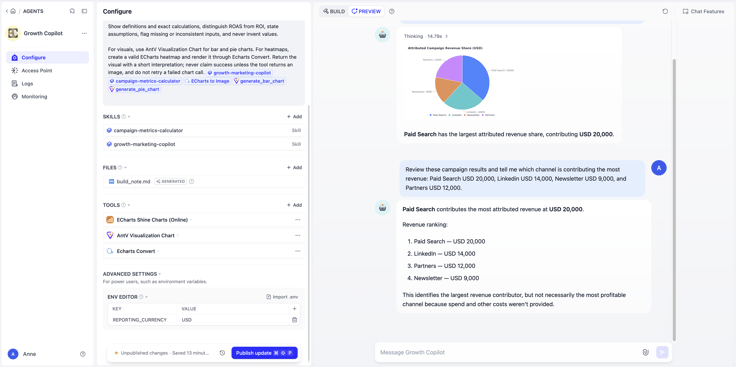
Choose the instructions, model, knowledge, tools, and safeguards the agent needs. In Dify's new Agent, a team could give a support agent a refund-request skill, access to policy knowledge, and relevant tools. The agent can work on its own or as a node in a workflow, while the team can still define its boundaries.
3. Test: Check more than the expected answer
Test ordinary requests alongside missing information, outdated policies, tool failures, and cases that need human approval. Check the steps the agent took, not only its final answer. Keep a small set of representative cases and expected outcomes so later changes can be tested against the same tasks.
4. Deploy: Release with a way to respond
Release the agent to a limited group, with an owner and a fallback plan. Record which version went live. In Dify, edits can be saved as a draft. The team can test in Preview and publish when everything is ready. The published version remains live until the update is published.
5. Operate: Review what happens with real requests
Review whether the agent helps users complete their tasks, as well as errors, response time, and cost. For a Dify Agent, sessions from its web app or a workflow appear in Logs. Those records help the team investigate what happened; people still judge whether the outcome was good enough.
6. Improve: Turn findings into a tested change
If the support agent begins using an old refund policy, identify the affected requests and the source of the problem. Update the relevant knowledge, instructions, or tool, then retest before publishing. Sometimes the best improvement is to narrow the agent's scope or hand more requests to a person.
7. Retire: End the agent's access and use
Retire an agent when its task disappears, another process replaces it, or its results no longer justify maintenance. Tell users what will handle their requests, disable the agent, remove access it no longer needs, and retain required records. Record its status, so an unused agent does not stay connected to live systems.
What should teams manage across every stage?
A useful lifecycle record does not have to be elaborate. For each agent, a team should be able to find its purpose, owner, current version, connected data and tools, permitted actions, test results, and recent review decisions. This gives the next person enough context to understand what the agent does and why it is operating in its current form.
The process should fit the agent's impact. A limited internal assistant may need a lightweight review. An agent that changes customer records or triggers financial actions calls for closer testing, clearer approvals, and more frequent checks. The point is to make the level of oversight a conscious choice rather than assume every agent carries the same risk.
Lifecycle management is one part of the broader work of overseeing agents across a business. For inventory, governance, costs, and cross-team ownership, link to the AI agent management platform pillar. Readers who need hands-on methods can continue to the articles on evaluating AI agents and monitoring AI agents.
AI agent lifecycle management best practices
Assign an owner before release. Every agent needs someone who can answer what it is for, review its results, and decide when it should change or stop operating. Record both the business purpose and the person accountable for it.
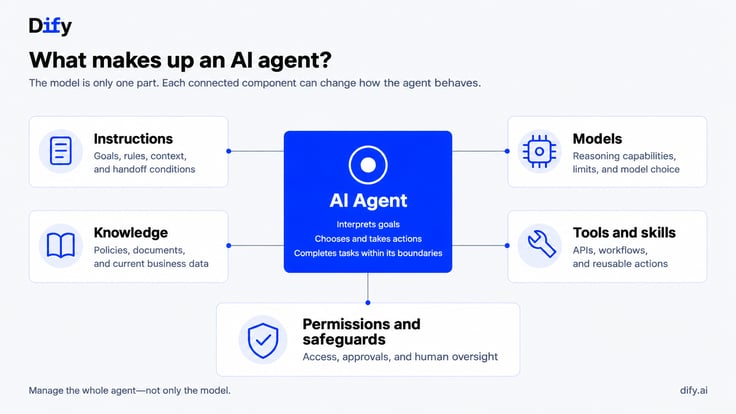
Manage the whole agent, not just the model. Instructions, knowledge sources, tools, and permissions can all affect behavior. Keep track of meaningful changes to these components and test the tasks they may influence before publishing a new version.
Turn production feedback into a tested change. A run that completes without an error may still give the wrong answer or take an unhelpful step. Review representative results against the criteria set during planning, then test fixes before release. For an Agent built in Dify, the team can use logs to find recurring support failures, revise its prompt, skill, knowledge, or tools, check the draft in Preview, and publish an updated version. The team still decides whether the new results are good enough.
Match oversight to impact. An agent that drafts suggestions needs different controls from one that updates records or triggers payments. Set testing, approval, and review requirements according to what the agent can access and the consequences of a mistake.
Make retirement part of the plan. Decide who can disable an agent, how its access will be removed, and what will handle its work afterward. An agent that no longer has a clear purpose or owner should not remain in use simply because it still runs.
The lifecycle becomes manageable when these practices lead to regular decisions: keep the agent as it is, improve it, limit its scope, or retire it.
関連記事
- Research
How to Monitor and Evaluate AI Agents in Production
Learn how to monitor and evaluate AI agents in production using logs, traces, metrics, and task-specific evaluations. This guide explains how to reconstruct agent runs, distinguish technical completion from task success, locate root causes, and turn production evidence into continuous improvement.
 Zhenan Sun
- Research
The Guide to AI Agent Management Platforms
Learn what AI agent management platforms do, why enterprises need them, and how to evaluate their governance, monitoring, cost, and lifecycle capabilities.
 Anne Zhu & Zhenan Sun
- Research
Beyond the Token Bill: Tracking Real AI Agent Costs and Value
Attribute spend across workflows, measure cost per successful task, and connect execution data to verified business outcomes.
 Yajing Wang
- Research
Trust Is a Feature: How Dify Is Governing a Growing Plugin Ecosystem
Security, transparency, maintenance, and the systems behind a marketplace people can rely on.
 Li