











For new users, configuring an API Key is the first step to getting started with Dify, but it can also be a barrier. Dify’s mission is to make AI application development simpler and more accessible. We want to lower that barrier further so more people can experience what Dify can do before deciding how to go deeper.
We’ve made a major upgrade to the Dify SaaS free trial experience, reducing the onboarding friction from two angles:
- Message Credits now support more model providers
- Curated templates on the Explore page are ready to try instantly
Message Credits Now Support 4 Major Model Providers
Your Message Credits are no longer limited to OpenAI models. We’ve added support for the following providers:

- OpenAI: A pioneer in large language models with balanced capabilities, a mature ecosystem, and an active developer community
- Anthropic (Claude): Known for safety and controllability, with strong performance in coding assistance and complex task execution
- Google (Gemini): Supports ultra-long context windows, excelling at long document processing and multi-turn complex conversations
- xAI (Grok): Focused on real-time information retrieval and agentic tasks, with strong context handling capabilities
Credit allowances per plan remain unchanged:
| Plan | Monthly Credits |
| Sandbox (Free) | 200 credits |
| Professional | 5,000 credits |
| Team | 10,000 credits |
You can start using AI models from all four providers without configuring any API Key. Whether you want to compare how different models handle the same prompt or quickly validate a use case, there’s nothing standing in your way.
If you need access to more advanced models or higher credit limits, you can upgrade your plan or configure your own API Key.
Try Curated Templates Directly from the Explore Page
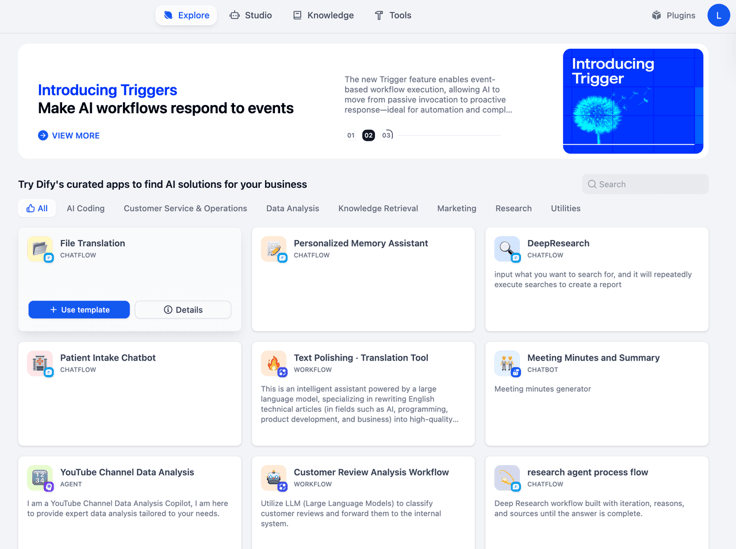
Beyond the model-level upgrade, we’ve also launched a template trial feature on the Explore page. You can now try curated templates directly without adding them to your workspace.
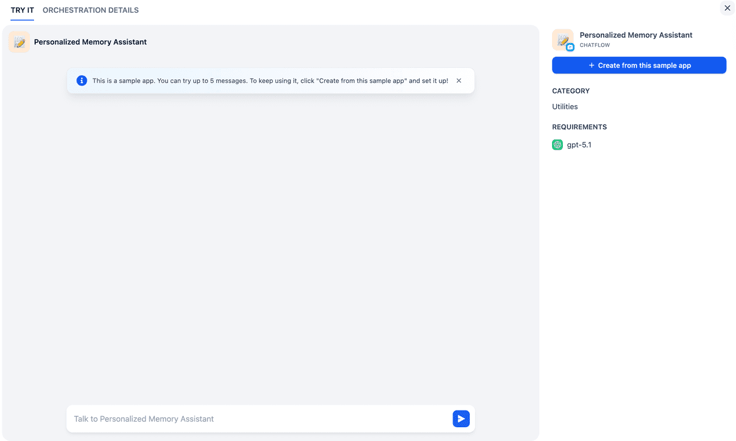
Each template offers a 5-message trial allowance, letting you experience its real-world performance before deciding whether to adopt it.
The first batch of templates available for trial:
| Template | Type | Core Capability |
| File Translation | Chatflow | Upload a document for one-click translation with multi-language professional file support |
| Personalized Memory Assistant | Chatflow | Automatically remembers key conversation details and delivers personalized responses |
| Patient Intake Chatbot | Chatflow | Collects user information through multi-turn dialogue and generates structured output |
Why These Templates?
The initial set of trial templates are all built on OpenAI models and require no additional plugin or tool configuration. They cover common enterprise scenarios including document processing, intelligent assistants, and information collection, giving you a clear picture of Dify’s workflow orchestration capabilities.
After trying a template, if it fits your needs, simply click “Create from this sample app” to add it to your workspace for further customization.
How to Get Started
- Log in to Dify Cloud
- Install the model plugin you want to try in Model Provider
- Go to the Explore page and click “Details” on any template card
- Start a conversation and experience the AI application in action
Final Thoughts
Lowering the barrier doesn’t mean lowering the standard. We want every user who comes to Dify to feel the power of AI application development in the shortest time possible. Whether you’re looking to quickly validate an idea or explore how AI can work for your team, now is a great time to start.
If you have any questions or suggestions along the way, feel free to reach out through our official forum.
Links
- Dify Cloud
- Pricing (credit consumption details for each model are available in the FAQ section)
Related articles
- Product
Dify x Sonilo: Give Your Video Workflows a Licensed Soundtrack
Turn finished videos into soundtracked outputs with Sonilo on Dify. Generate licensed music and sound effects matched to each cut, all within the same workflow.

 Sonilo & Dify
 - Product
From Discovery to Response: A More Connected Dify Marketplace
Good work goes further with better ways to find it, build with it, and share what you learn
 Yajing Wang
 - Product
Why We Redesigned Dify's Agent?
Discover how we redesigned Agent, and how we came to see agents and workflows not as isolated components, but as collaborators that support daily work.
Dify - Product
From Logs to Evidence: Asqav Joins Dify Marketplace to Make Every Agent Action Verifiable
Dify Agents can now produce verifiable, tamper-evident receipts for actions routed through Asqav, our ecosystem partner now live on Dify Marketplace.
 Asqav & Dify