











Building an AI application on Dify means connecting models, tools, and knowledge bases into a workflow that solves a real problem. Until now, sharing those workflows usually meant exporting a file, sending a link, or walking someone through configuration step by step.
Today, Dify Creator Center and Template Marketplace are officially live — a place built for creators to publish their workflow templates, and for users to discover and put them to work in minutes.
This launch is more than moving features to the front of the house. Over the past few months of beta and feedback, we've systematically polished the entry points, the multilingual experience, and the content layout, with one goal in mind: closing the gap between building and sharing, so every template a creator publishes can be found by the right user at the right moment.
From building to using
Dify now ties publishing and using a template into a single, continuous path.
Creators publish and manage templates in the Creator Center. Users discover and adopt them in the Template Marketplace. From building to publishing to using, the flow is connected — workflows naturally circulate, instead of staying locked inside one person's workspace.
Template Marketplace
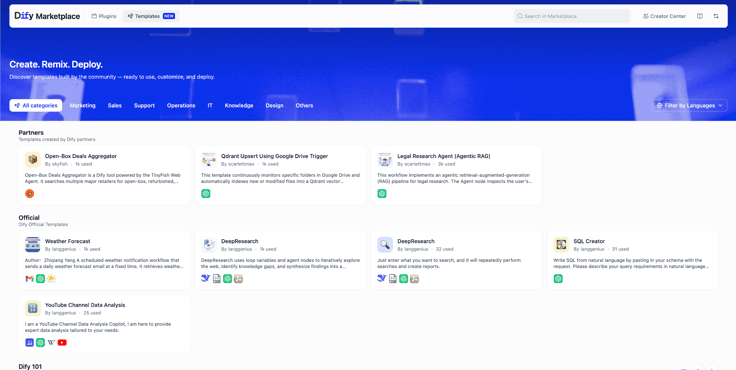
Alongside a refreshed Plugins shelf, this update introduces a dedicated Templates entry, listed next to plugins and tools so users can browse and adopt all in one place.
You can filter by category, tag, or creator to quickly find a quality workflow and use it out of the box. New users get 200 free credits at signup to try out model capabilities and start building right away.
Creator Center
How to get to the Creator Center
There are several ways into the Creator Center, depending on whether you want to publish an existing app, explore creator features, or learn how to become a creator:
· Official site — visit the Creator Program page.

· Marketplace — click the Creator Center entry in the top-right corner of the Template Marketplace
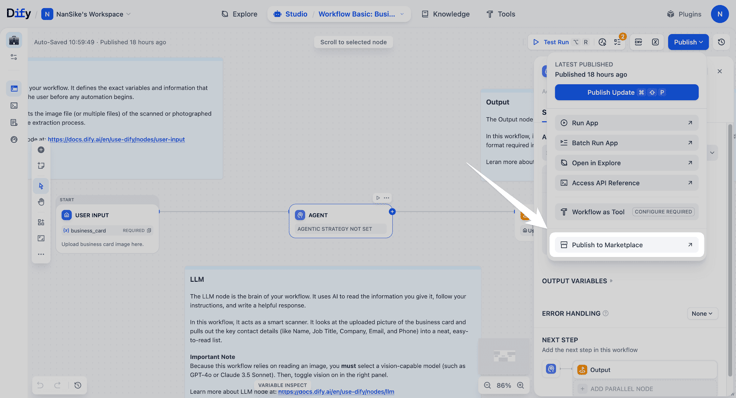
· In Dify Studio — once you've built an app, you can publish it directly from the workspace.
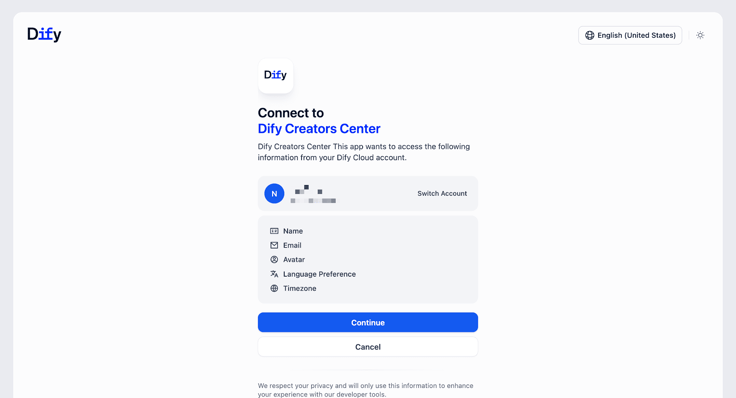
Sign in with your Dify account.
Template detail pages
Every template has its own detail page, so users can understand what they're getting before they install:
· Graph view, a visual preview of the workflow structure, so users know roughly how it works before adopting
· One-click share, share a template link with your team or community at any time
· Open in Dify, adopt the template in one click; Dify guides you through the setup
Publishing your first template
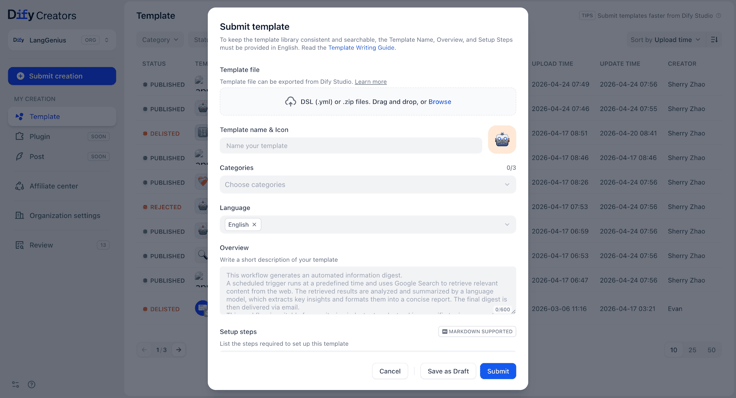
Creators can upload templates through the Creator Center or publish directly from Dify Studio.
Publishing flow:
1. Build and test your workflow in Dify Studio.
2. Click Publish → Publish to Marketplace (or upload an exported template file in the Creator Center).
3. Fill in the template details in English: name, categories, overview, and setup steps.
4. Submit for review. Once approved, your template will appear in the Marketplace.
For detailed guidance on writing effective templates, naming conventions, and submission best practices, please refer to the “Publish to Marketplace” documentation.
More highlights
Featured Template Examples
YouTube Channel Data Analysis
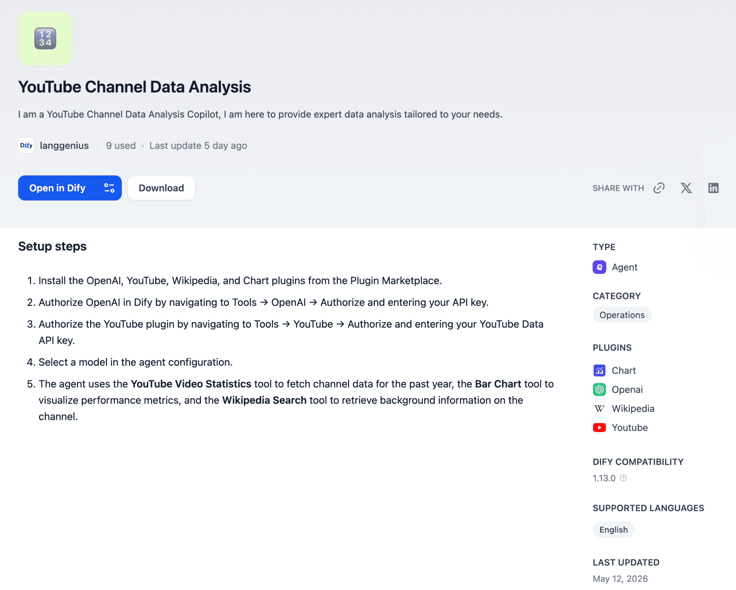
Built on top of YouTube APIs and visualization workflows, this template helps creators quickly analyze channel and video performance, automatically generate reports and trend insights, and better understand audience growth and content performance.
By combining data retrieval, analytics, and visualization into a reusable workflow, it’s especially useful for content operations teams and creators managing ongoing channel analysis.
Doc Extractor: AI Summarizer
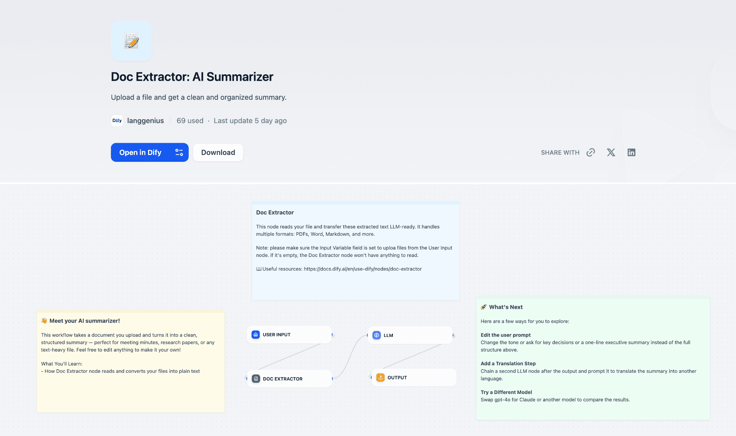
This workflow supports structured document parsing and intelligent summarization, transforming raw files into clear, readable summaries and insights.
It’s ideal for enterprise document processing, meeting recap generation, internal knowledge management, and other scenarios where teams need to improve information processing efficiency while reducing manual effort.
Organization accounts
Creators can publish as an individual or as an organization. Organization settings let admins invite collaborators and assign template-submission and edit permissions.
We welcome partners to create organization accounts to manage templates more efficiently, build out enterprise-grade solution sets, and access ecosystem-level support, including curated partner placements and joint PR opportunities.
Start building, start sharing
Whether you're a creator or an explorer, the ecosystem is ready for you.
Publishing a template here is more than expressing a point of view, it's becoming a builder of solutions. Turning ideas into reusable templates and workflows is a way to extend your reach, and to convert what you build into compounding revenue and skill.
Start with a single template. Turn an idea into a real, usable AI solution. Build it, share it, and let it keep creating value.
From idea to delivery, from building to sharing.
Related articles
- Release
Introducing New Agent
Build agents by chatting. Dify automatically generated reusable skills and preserves the context during the conversation. When it's ready, add it into the workflow for a bigger process.
 Zhenan Sun
 - Release
Dify's Official CLI: difyctl Ships
Dify introduces CLI access, making it easy for Agents to call Dify apps with a single command.
Zhenan Sun - Release
Dify 1.14.1: Workflows Become a Team Asset
Move workflows from “built” to “continuously used and reused,” so AI can fit into enterprise processes.
 Dify
Dify - Release
Dify 1.12.0 Summary Index: From fragmented retrieval to full context
Summary Index lets you attach summaries to chunks so related content is returned together.
Dify