











In a typical large enterprise, data, process documents, and IT systems all exist, but they’re often disconnected.
- People who understand the business process often don’t know where the data lives or how it is used, so ideas tend to remain as concepts rather than becoming executable plans.
- Engineers who understand the data may not fully understand the business logic. Many data quality issues originate from how processes are executed, leaving data teams to repeatedly clean things up downstream while the same problems keep recurring.
- IT systems hold large amounts of data, but much of it still stays at the level of records and queries. The kind of intelligent workflows businesses actually need, where systems can proactively make judgments and recommendations, remain difficult to put into practice.
Dify 1.14.1 isn’t about piling on new features. It’s a refinement release. Capabilities from recent versions have been reorganized, separated, and hardened so they map more naturally to how teams actually collaborate and operate.
This release focuses on three things:
- Collaboration on the canvas: Business, product, and engineering can align workflow logic in one place, instead of translating requirements across documents.
- Reusable, validated logic: Node configurations you’ve already proven can be copied across workflows and across Dify instances.
- Better integration with existing toolchains: The new Human Input API enables external systems to participate in in-flow approvals without breaking the workflow.
At its core, 1.14.1 fills in a missing layer for information flow. It helps the people who understand the business and the people who build the system work on the same canvas, and it makes workflows, outcomes, and hard-won experience easier to move across teams.
Canvas Collaboration: from a personal tool to a team asset
Structural breakdowns in enterprise information often share a common cause: the people designing a process and the people executing it never share a working surface. The business side describes logic in documents, while engineering implements it in code. The two views are rarely the same.
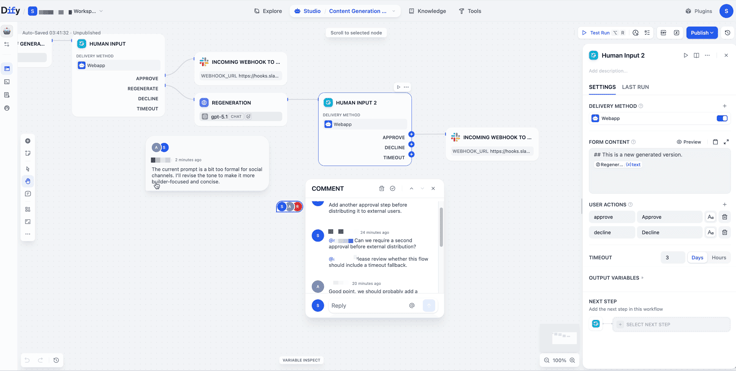
Dify 1.14.1 ships real-time multi-user collaboration on the workflow canvas.
Product, engineering, and business teams can now discuss logic, leave comments, and adjust a workflow on the same canvas, with live visibility into each other’s edits.
For example:
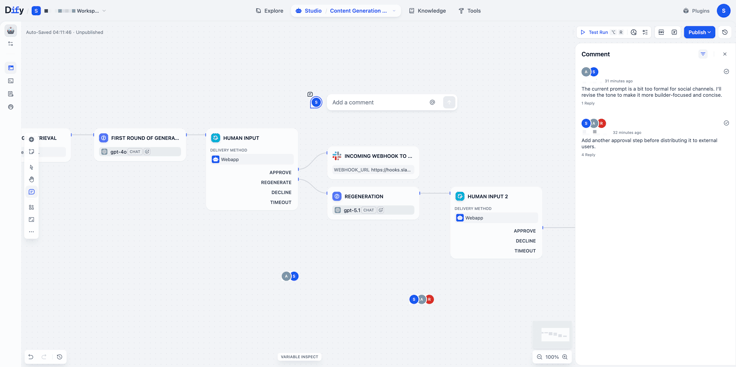
After a PM builds an intent-routing flow on the canvas, business teammates can leave comments directly on the relevant nodes to point out missing response details for specific scenarios. Engineers can then adjust the node based on the feedback and @ the business teammate for confirmation. The entire discussion, revision, and confirmation process stays on the same canvas, so teams no longer need to switch back and forth between chat tools, requirement docs, and workflow settings, and the collaboration context stays intact.
Canvas comments
- Right-click any blank area on the canvas and select “Add comment” to start a discussion. Comments can also be deleted or edited later.
- Press C to enter comment mode for quick follow-ups.
- Mention a teammate with @ in a comment, and they will receive an email notification.
Only when information becomes a shared team asset can it be handed over, reused, and continuously improved.
Bringing AI into enterprises is not just about model capability, it also requires collaborative process design and governance.
Note: To ensure a stable experience for Dify Cloud users, collaboration features are still being gradually tested and rolled out, and will officially launch in a future release.
Node Reuse: portable logic modules
Tuning a piece of workflow logic, such as a data format conversion, an intent-classification branch, or a generation node with a carefully crafted prompt, usually takes time. Before 1.14, that work was largely confined to a single workflow. Reusing it elsewhere often meant rebuilding it from scratch and reconnecting variables and surrounding logic.
Starting in 1.14.0, nodes are designed as copyable, portable units.
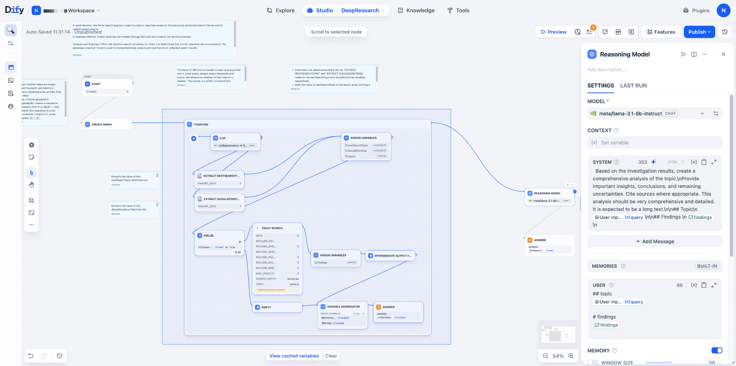
With the exception of the user input node, every node supports copy and paste across three levels:
- Within the same workflow: reuse a configured node in another branch without reconfiguring it.
- Across workflows: copy a node from one workflow and paste it into another within the same Dify instance.
- Across Dify instances: copy a node from one Dify instance and paste it into another, for example from staging to production, or when sharing configuration across teammates.
What travels with the node?
The node’s own configuration, including parameters, prompt text, model selection, and internal settings, is carried to the destination. Anything that depends on the surrounding environment is evaluated again at the destination, and some items may need to be reconnected manually:
- Workflow resources: variable references. If a variable exists in the source workflow but not in the destination, you will need to reselect or remap it.
- Workspace resources: tools, plugins, and knowledge bases. If a required plugin is not installed in the destination instance, it must be installed first.
Node reuse has two requirements for the runtime environment: the Dify versions of the source and the target should be the same or compatible, as differences in node schema across versions may lead to compatibility issues; cross-workflow copy and paste must be performed in a secure browser environment (HTTPS or localhost), due to browser restrictions.
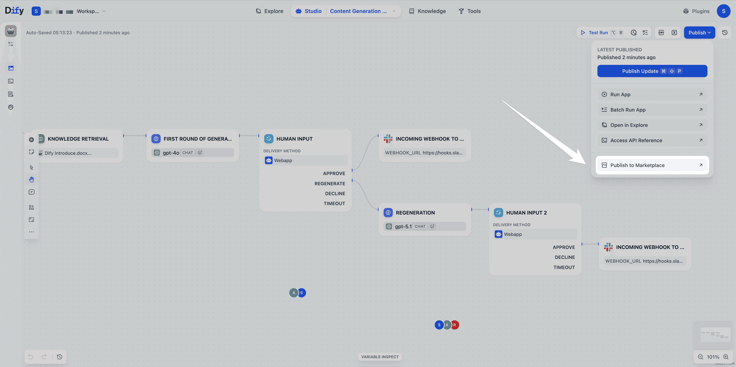
If you want to share an entire workflow with others, Dify 1.14 also introduces the Creator Center and Template Marketplace. After building your workflow in Dify Studio, you can publish it directly to the marketplace with a single click, without manually exporting files. From node-level reuse to workflow-level sharing, knowledge is no longer confined to individuals. More updates and activities around the Creator Center are coming soon.
Connecting Dify reliably to your existing toolchain
In real enterprise use, Dify is often one link in a longer chain. Workflow outputs may need to post into collaboration tools, write back to internal systems, or feed downstream business platforms. In 1.14.1, we strengthened that integration layer.
Human Input API is now available
Dify has supported in-flow human approvals since v1.13.0. In earlier versions, review actions could only be completed inside the Dify Console. Starting with 1.14, we provide a HITL Service API so external systems can drive these steps directly.
Learn more about the detailed functions.
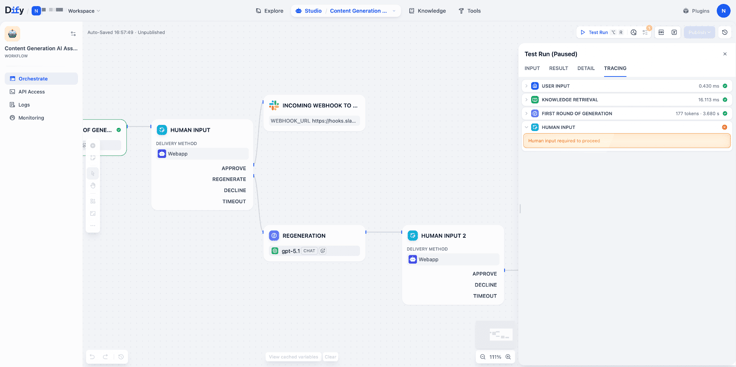
Previously, manual approvals could only be handled within the Dify Console. Starting from v1.14, we introduced the Human Input Service API, allowing approval steps to be integrated with external systems.
External tools can query pending tasks, retrieve form data, and submit approval results to resume workflow execution. Steps that previously had to be completed inside Dify can now be integrated into tools like Slack or enterprise IM platforms, where business users make decisions and the workflow continues automatically in the background.
The original approval interface in the Dify Console is still available, and both approaches can be used in parallel.
For more usage details and API specifications, please refer to the API documentation.
Stability Improvements
This release includes a set of fixes for MCP, plugins, and Marketplace issues that have been frequently reported by the community, with a focus on improving integration reliability and overall runtime stability. Full details can be found in the Release Notes.
If you skipped the previous minor release: v1.13.1 further improved document and file handling, including dataset document downloads, original file download links, and file payload support in message streams.
Together with this release’s collaboration mode and node reuse, document-based workflows can now be built collaboratively and reused across scenarios more smoothly.
For more details, refer to the v1.13.1 release notes.
Closing
As AI capabilities continue to evolve, the way teams collaborate is changing as well.
The once clearly defined boundaries between product, design, and engineering are becoming increasingly blurred: designers can now use AI to generate more diverse code outputs, engineers are more involved in product decisions and analysis, and PMs can quickly prototype demos to iterate on product direction.
With Dify v1.14.1, the collaborative canvas enables business and technical teams to finally work and communicate on the same workflow. The Template Marketplace allows individual insights and solutions to be shared and reused across teams. Together, these changes point toward a larger goal:
Making AI not just a smart interface, but a foundational layer that can be embedded into real business workflows and continuously operate.
When tools align closely with how teams actually work, automation happens naturally.
Upgrade to v1.14.1 and turn your workflows into a shared workspace for your team.
See the upgrade guide for details, and feel free to share your collaboration use cases with the community.
Related articles
- Release
Introducing New Agent
Build agents by chatting. Dify automatically generated reusable skills and preserves the context during the conversation. When it's ready, add it into the workflow for a bigger process.
 Zhenan Sun
 - Release
Dify's Official CLI: difyctl Ships
Dify introduces CLI access, making it easy for Agents to call Dify apps with a single command.
Zhenan Sun - Release
Build · Share · Earn: Dify Creator Center And Template Marketplace Are Now Live
A unified platform for creators to publish and for users to discover, enabling workflows to be quickly reused and adopted at scale.
Zhenan Sun - Release
Dify 1.12.0 Summary Index: From fragmented retrieval to full context
Summary Index lets you attach summaries to chunks so related content is returned together.
 Dify
Dify