











Dify Integration with TrueFoundry's AI Gateway
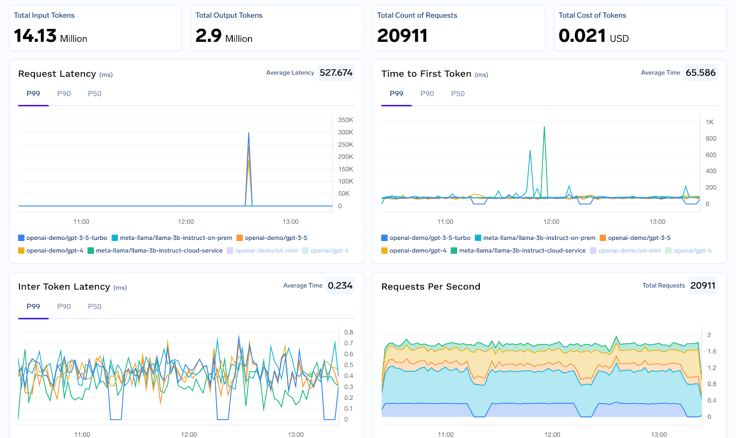
Dify now integrates with TrueFoundry’s AI Gateway, bringing enterprise-grade infrastructure to your existing workflows. Teams can gain real time cost visibility, enforce security and compliance controls, and access 250+ LLMs while keeping Dify’s drag and drop simplicity to scale AI automation with confidence.

Building AI Agents with Dify is awesome. The platform makes it super easy to create chatbots, AI agents, and smart search systems without writing tons of code. You can drag and drop components, connect to different AI models, and get your prototype running in minutes.
But here’s the thing: moving from development to production is where most AI projects stumble. What works perfectly with a few test users can break spectacularly when thousands of real customers start using it. TrueFoundry AI Gateway bridges this gap seamlessly. Think of it as your production-ready safety net - it takes your Dify agents from dev to prod without the usual headaches of crashes, security vulnerabilities, or surprise bills that can sink your project.
This comprehensive guide will walk you through the process of integrating Dify with TrueFoundry's AI Gateway, a powerful combination that will unlock enterprise-grade features for your AI agents. We'll also delve into the strategic importance of using an AI gateway and how it can help you build a secure, scalable, and cost-effective AI ecosystem.
Why Your Dify Agents Need an AI Gateway
Let's be honest - ai Dify agents are great for getting started, but production is a different game. Here's what changes when you add TrueFoundry AI Gateway to the mix:
1. Get Complete Control Over Costs
- Want to Dify track usage across all your agents? The gateway gives you real-time dashboards showing exactly how much you're spending
- Set budgets for different teams or projects
- Get alerts before you blow through your monthly AI budget
- See which models are costing you the most money
2. Lock Down Security Without Breaking Things
- Add role-based access control - only the right people can use expensive models
- Automatically remove sensitive data from prompts before they hit the AI models
- Keep detailed audit logs of who asked what and when
- Deploy on-premises or in your own cloud for maximum security
3. Never Go Down When AI Providers Have Issues
- If OpenAI is having problems, automatically switch to Claude or another provider
- Load balance requests across multiple regions
- Retry failed requests automatically
- Keep your Dify completion mode agents fast and responsive
4. Future-Proof Your AI Stack
- Switch between OpenAI, Anthropic, Groq, or any other provider without changing a single line of code in Dify
- Test new models without rebuilding your agents
- This is what modern Dify LLMOps looks like in practice
How to Integrate Dify with TrueFoundry's AI Gateway: A Step-by-Step Guide
Integrating Dify with TrueFoundry's AI Gateway is a simple process that can be completed in just a few steps. Here's a detailed walkthrough:
5. Generate Your TrueFoundry Access Token:
- Log in to your TrueFoundry dashboard and navigate to the Access Management section.
- Click on New Personal Access Token to generate a new token.
- Copy the token and store it in a secure location. You'll need it to configure Dify.
6. Access Dify Model Provider Settings:
- Log in to your Dify workspace.
- Go to Settings and then select your Model Provider.
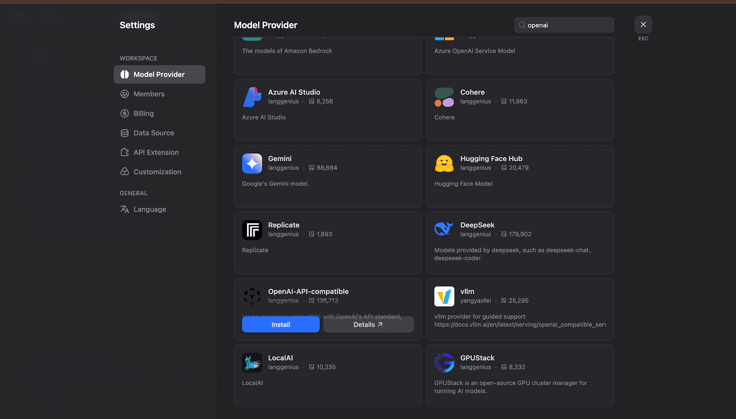
7. Install the OpenAI-API-Compatible Provider:
- In the Model Provider section, search for OpenAI-API-compatible and click on Install.
- Now, you'll need to configure the provider with your TrueFoundry details.
8. Get Configuration Details from TrueFoundry:
- Navigate to your TrueFoundry AI Gateway to get the correct model identifier.
- You'll also need to get the API endpoint URL from the unified code snippet provided by TrueFoundry.
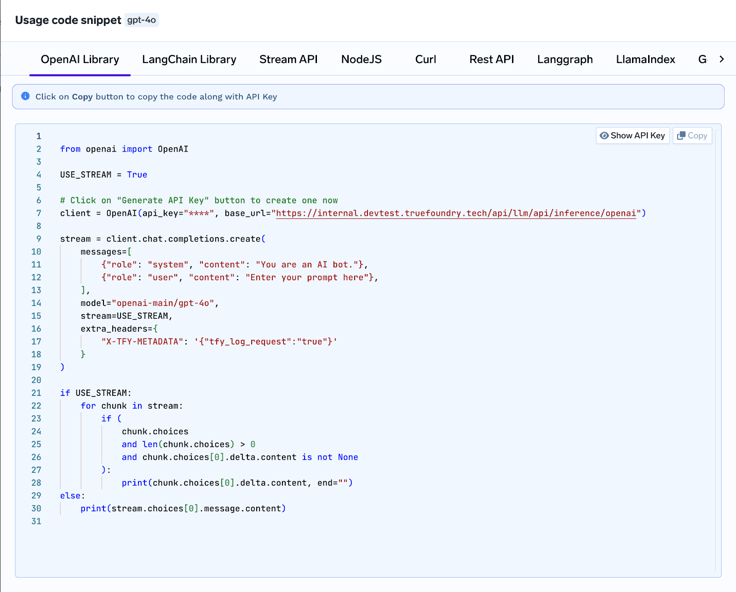
9. Configure and Test Your Integration:
In the OpenAI-API-compatible provider settings in Dify, enter the following information:
- Model Name: Your TrueFoundry model ID (e.g., openai-main/gpt-4o)
- Model display name: A display name for the model (e.g., Gpt-4o)
- API Key: Your TrueFoundry Personal Access Token
- API endpoint URL: Your TrueFoundry Gateway base URL
- model name for API endpoint: The endpoint model name (e.g., chatgpt4.0)
- Completion mode: Select Chat
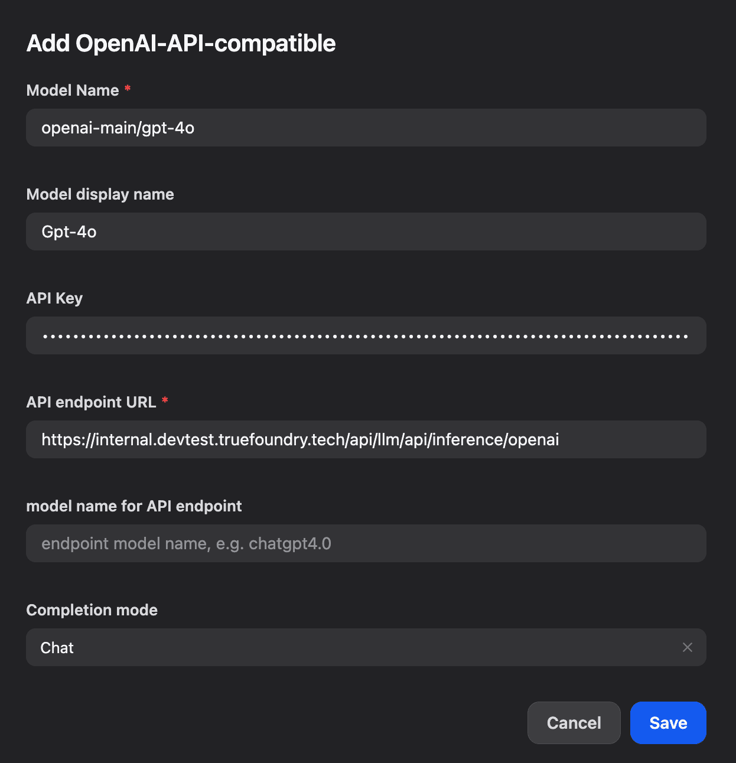
- Click on Save to apply the configuration.
- Create a new agent or workflow in Dify and test the integration by sending a request to the model.
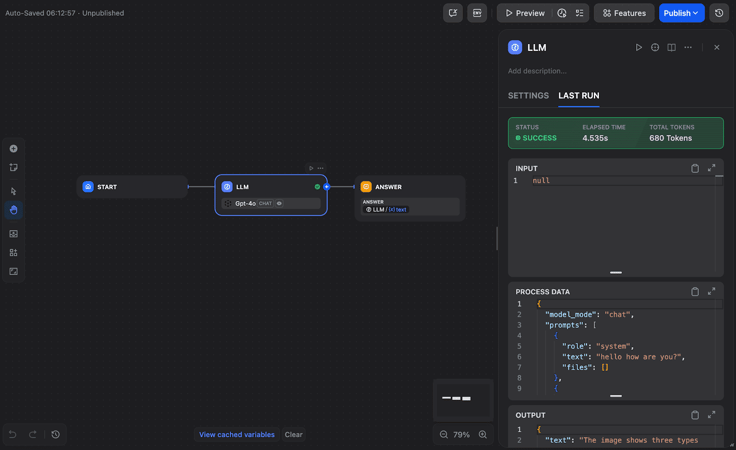
That's it! You've successfully integrated Dify with TrueFoundry's AI Gateway. You can now start building powerful AI agents with the peace of mind that comes with enterprise-grade governance and management.
Real-World Use Cases
Let's look at how different types of teams use this setup:
10. News and Content Teams
If you're building Dify ai news bots or content generators, the gateway helps you:
- Load balance across regions so responses stay fast during traffic spikes
- Set rate limits to prevent runaway costs when a story goes viral
- Switch models based on content type (use cheaper models for summaries, premium models for original writing)
11. Customer Support Teams
For customer service chatbots:
- Automatically strip out customer personal info before sending prompts to AI models
- Keep detailed logs for compliance audits
- Fail over to backup models when your primary provider is having issues
12. Engineering Teams
For internal AI assistants and code helpers:
- Mix expensive cloud models with cheaper self-hosted options
- Give different access levels to junior vs senior developers
- Track which teams are using AI the most
Advanced Features You Should Know About
13. LLMOps Integration
The gateway becomes your central nervous system for Dify LLMOps. You can:
- A/B test different models without touching your Dify agents
- Gradually roll out new models to a subset of users
- Monitor quality metrics across all your AI interactions
14. Infrastructure as Code
For teams running a serious Dify labs ai infrastructure stack, you can configure everything through APIs:
- Automate model deployments
- Set up monitoring and alerting programmatically
- Integrate with your existing DevOps workflows
15. Getting Started Checklist
Ready to set this up? Here's your quick checklist:
- Create TrueFoundry account and generate access token
- Note down your gateway base URL and model IDs
- Install OpenAI-API-compatible provider in Dify
- Configure the connection with your token and base URL
- Test with a simple chat interaction
- Set up basic budgets and alerts in TrueFoundry
- Monitor Dify logging and gateway analytics
- Configure fallback models for reliability
The Bottom Line
Combining Dify with TrueFoundry AI Gateway gives you the best of both worlds:
- Keep Dify's simplicity for building and iterating on AI agents
- Add enterprise-grade infrastructure for security, reliability, and cost control
- Future-proof your stack so you can adapt as AI technology evolves
This isn't just about connecting two tools - it's about building AI agents that can handle real business requirements. Whether you're processing thousands of customer support tickets or generating content for millions of readers, this combination gives you the foundation to scale confidently.
Want to get started? Create your TrueFoundry account, follow our quick start guide along with the setup steps above, and you'll have a production-ready AI stack running in about 15 minutes. No complex migrations, no code rewrites - just better performance, security, and control for your AI agents.
Related articles
- Product
Dify x Sonilo: Give Your Video Workflows a Licensed Soundtrack
Turn finished videos into soundtracked outputs with Sonilo on Dify. Generate licensed music and sound effects matched to each cut, all within the same workflow.

 Sonilo & Dify
 - Product
From Discovery to Response: A More Connected Dify Marketplace
Good work goes further with better ways to find it, build with it, and share what you learn
 Yajing Wang
 - Product
Why We Redesigned Dify's Agent?
Discover how we redesigned Agent, and how we came to see agents and workflows not as isolated components, but as collaborators that support daily work.
Dify - Product
From Logs to Evidence: Asqav Joins Dify Marketplace to Make Every Agent Action Verifiable
Dify Agents can now produce verifiable, tamper-evident receipts for actions routed through Asqav, our ecosystem partner now live on Dify Marketplace.
 Asqav & Dify