












Video workflows on Dify can now ship with sound. The Sonilo plugin is live on the Dify Marketplace: tools that compose licensed music and sound effects from the video your workflow just produced.
Until now, the soundtrack lived outside the pipeline. You rendered the video, downloaded it, searched a stock library, checked the license terms, and lined a track up in an editor by hand.
That manual step matters more as your pipelines get more autonomous. When an agent publishes video without a human review step, you want audio that is licensed for commercial use.
With the plugin, you add a node, pass it the finished video, and get back an original soundtrack composed for that exact cut. The music is licensed and safe for commercial use (terms apply). Every generated track has its own license ID on record with Sonilo.
What the Sonilo plugin does
The plugin ships four tools: video-to-music, text-to-music, video-to-sound-effects, and text-to-sound-effects.
Video-to-music
This is Sonilo’s core capability and the reason it fits video workflows so naturally. Sonilo composes from the finished video, not from a text prompt describing it.
Pass it the video (a public or signed URL) and the model reads the cut: scene changes, pacing, where the mood turns. A hard cut at the eight-second mark shows up in the music. So does the slow push-in at the end. The track follows the edit and ends exactly when the video ends.
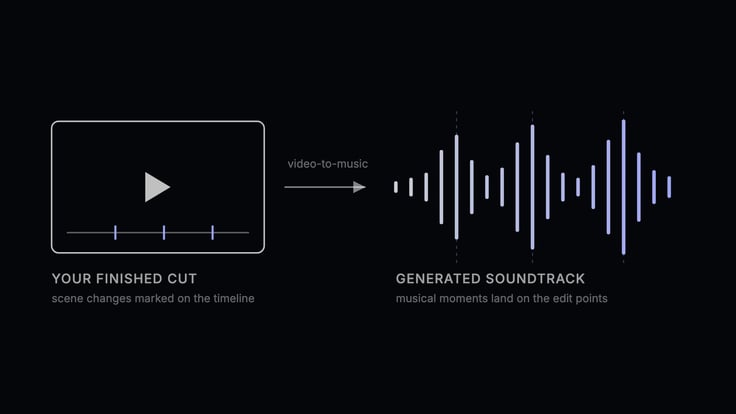
From cut to soundtrack: musical moments land on the edit points
In a workflow, that difference is practical. A text-to-music step needs an accurate written description of footage the model never sees, and the resulting track still has to be trimmed and matched by hand afterward. A video-to-music node works from the artifact your pipeline already produced.
There’s also no prompt engineering involved. The agent doesn’t have to describe a video in words and hope the description was good. It passes the file. Prefer plain words? Fill in “Describe the vibe” and the tool writes the style prompt for you before composing.
Text-to-music
The plugin also generates music from a written prompt. That’s useful earlier in a pipeline, when an agent is working from a brief and the video doesn’t exist yet, or when a project calls for standalone tracks.
Video-to-sound-effects
From the same video upload, Sonilo can also generate royalty-free sound effects matched to what happens on screen: ambience under a long scene, an impact landing on a hard cut. The same video can be passed to video-to-music and video-to-sound-effects to generate the score and the effects layer as separate tracks.
Text-to-sound-effects
The fourth tool generates royalty-free sound effects from a written prompt: a door slam, rain on glass, a crowd swell. Useful when a specific moment needs a sound and there’s no video to work from.
Getting started
- In Dify, open the Marketplace, search for Sonilo, and install
sonilo-ai/sonilo. - Create an account at platform.sonilo.com and copy your API key from the dashboard. New accounts come with free credits.
- Back in Dify, open the plugin’s authorization settings and add the key as
SONILO_API_KEY.
Once authorized, the Sonilo actions appear alongside your other tools in the workflow editor.
The free trial covers a first pass on each tool: one video-to-music run, one video-to-sound-effects run, and two generations each for text-to-music and text-to-sound-effects. Commercial publishing rights come with the applicable paid plan, so you can validate a workflow first and upgrade when it starts shipping real work.
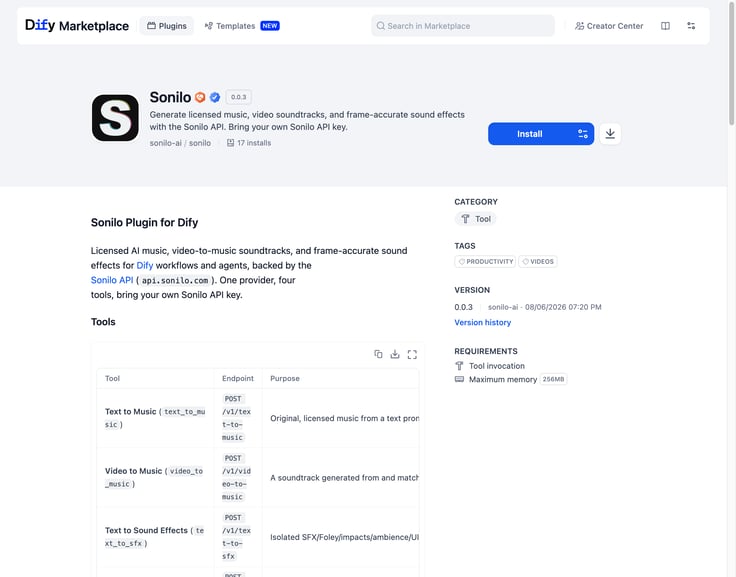
Sonilo plugin on the Dify Marketplace
Using it in a workflow
The fastest way to see it working is the template we published together: search the Template Marketplace for “Generate a licensed soundtrack for your video”, from the @sonilo org (look for the Partner badge).
The template is deliberately small. Four nodes:
- Start takes the URL of your rendered video.
- Sonilo sends the video off for scoring and returns the generated music.
- Code parses the response into clean outputs: the audio URL, status, and duration.
- End returns them to the user.
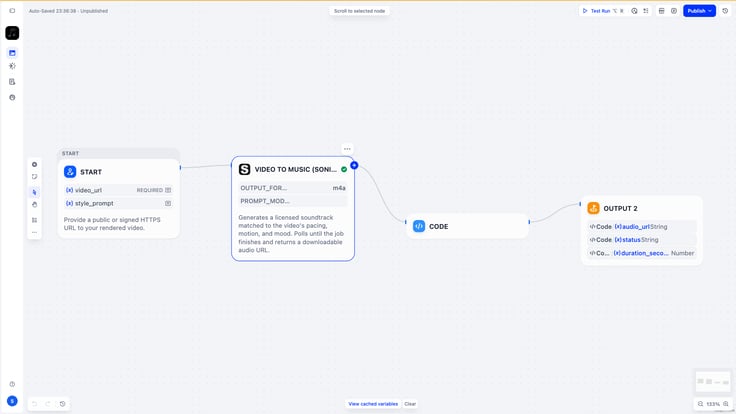
The template’s four-node workflow canvas
To run it:
- Open the template from the Template Marketplace and add it to your workspace.
- Click the Sonilo node to check its settings: the video input, an optional style prompt (or a plain-language vibe description), and the output format.
- Hit Test Run, give it a video URL, and start the run.
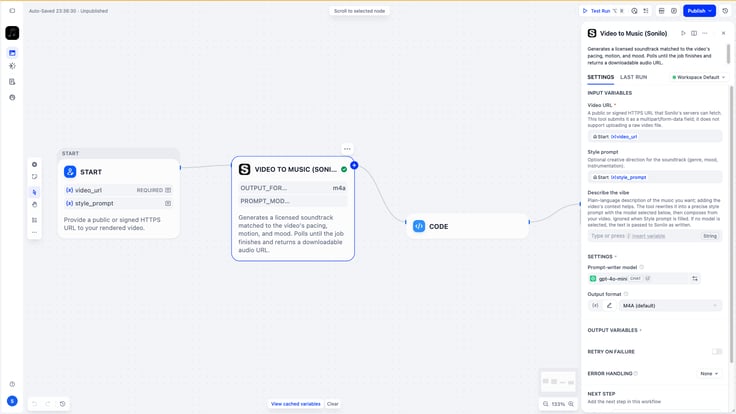
Configuring the Video to Music node
Run it with any video and you get a soundtrack matched to that edit, licensed and safe for commercial use.
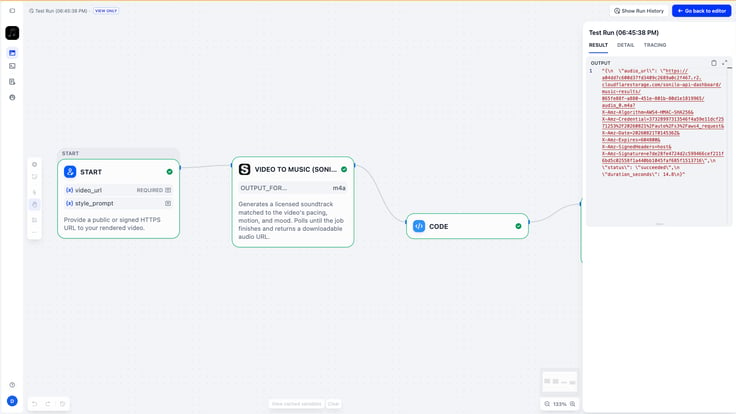
A successful run: the result panel returns the soundtrack URL
If the first take isn’t right, run it again. Each generation is a fresh original track for the same cut, so auditioning options costs one more run.
The template is meant to be extended. Swap the Start node for the output of a video-generation step and the workflow scores each video as it’s produced; a merge step downstream (ffmpeg in an Agent node, or your editing tool) combines the returned audio with the video file. Wrap it in a loop and it scores a whole batch.
You can also add a second Sonilo node that calls video-to-sound-effects on the same video for a royalty-free effects track.
Real-world use cases
Imagine building a marketing pipeline that scores its own videos: demo cuts and feature announcements run through the workflow, and every video leaves with an original track composed for it, licensed for commercial use.
Or an agent that hands over finished work: chain a video-generation step into Sonilo, merge the returned track downstream, and the agent’s output arrives with a licensed soundtrack instead of waiting on a human to pick music. The same loop covers batch work, where each cut of a master gets a track composed for its own edit.
Try it
Install sonilo-ai/sonilo from the Dify Marketplace, get a key at platform.sonilo.com, and run the template on a video you’ve already made. Three steps, and you have a soundtrack composed for your video, ready to merge into the final cut.
Licensing and commercial-use details are governed by Sonilo’s Terms of Service; full licensing information at sonilo.com/licensing.
About Sonilo
Sonilo generates original music and sound effects from finished video. Upload your edit: it reads the timing, pacing, and emotional arc, composes music that matches the video length, and places sound effects on the exact action frames, returned as one finished audio track. Other capabilities include text-to-music, text-to-sound-effects, dubbing, and audio ducking. Every track is licensed for commercial use. Sonilo runs on the web and by API, with a free plan to start.
Website | Licensing | X | LinkedIn | YouTube | Discord
About Dify
Dify is an open-source, production-ready platform for building agentic AI applications. It gives enterprises and developers an intuitive low-code interface to build, deploy, and operate generative AI applications at speed.
As of August 2026, Dify has surpassed 154+ GitHub stars, making it one of the most widely adopted open-source AI projects in the ecosystem.
Built around core capabilities including workflow orchestration, agent frameworks, data management, and model integration, Dify significantly lowers the barrier to adopting advanced AI technologies. Whether you are an independent developer or part of a large organization. Teams ship AI-powered workflows faster, with less engineering overhead and lower operational cost, turning generative AI from an experiment into a sustainable business advantage across operational automation, knowledge services, customer support, and intelligent analytics.
Related articles
- Product
From Discovery to Response: A More Connected Dify Marketplace
Good work goes further with better ways to find it, build with it, and share what you learn
 Yajing Wang
 - Product
Why We Redesigned Dify's Agent?
Discover how we redesigned Agent, and how we came to see agents and workflows not as isolated components, but as collaborators that support daily work.
 Dify
Dify - Product
From Logs to Evidence: Asqav Joins Dify Marketplace to Make Every Agent Action Verifiable
Dify Agents can now produce verifiable, tamper-evident receipts for actions routed through Asqav, our ecosystem partner now live on Dify Marketplace.
 Asqav & Dify
 - Product
Now on Dify Marketplace: Qubrid AI Brings Multi-Model Access to Every Dify Workflow
Install the Qubrid AI plugin on Dify to unlock unified access to DeepSeek, Kimi, Qwen, MiniMax, GLM, and more, all through one API key.
 Qubrid AI & Dify