











Extension Plugin Endpoint: Bringing Serverless Flexibility to Dify
Introducing Dify’s new Endpoint, which lets Extension plugins handle custom HTTP requests and leverage reverse calls for greater flexibility. It enables features like custom web interfaces, OpenAI-compatible APIs, and asynchronous event triggers, expanding what’s possible within the Dify ecosystem.

About Endpoint
The Endpoint is a new, extensible type introduced in Dify’s v1.0.0 plugin system, providing a new API entry point for Dify. Plugins can define the logic of these APIs through code. From the developer’s perspective, this is akin to running an HTTP server within Dify, with the server implementation entirely determined by the developer. To better understand the concept of Endpoint, consider the following diagram:
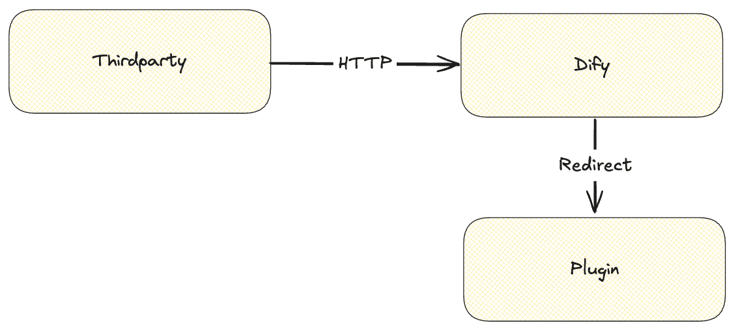
The specific logic of an Endpoint is implemented within the Extension Plugin. When the user activates the Endpoint, Dify generates a random URL for the user, formatted as https://abcdefg.dify.ai. When Dify receives a request to this URL, the original HTTP message is forwarded to the plugin, and the plugin behaves similarly to a serverless function—receiving and processing the request.
However, this is just the basic functionality. To allow the plugin to call apps within Dify, we’ve introduced a reverse call feature. After this protocol is complete, certain IM-type requirements reach a closed loop. However, the potential of Endpoint goes far beyond this. This article delves deeper into the capabilities of Endpoint, exploring its practical applications.
Examining the Core Capabilities
Originally, Endpoint was designed as a module to handle Webhooks, intended to abstract complex and hard-to-generalize low-code/no-code workflows into reusable code implementations via plugin logic. As a result, we introduced features like reverse calls. However, as usage deepened, we discovered that Endpoint actually has broader applications. At its core, it is a serverless HTTP server. While it doesn’t support long connection protocols like WebSockets, it can perform most of the functions of an HTTP server. For example, it can be used to build a wrapper around a Chatbot.
WebApp Templates
Currently, Dify’s WebApp is still fairly basic, and customization options for styling are almost nonexistent. Since it’s difficult to fine-tune every specific scenario and client-side need, why not implement these requirements through Endpoint? Imagine a plugin that includes several Endpoints, each with a different template style, such as minimalistic, anime-cute, Korean, or Western styles. Behind these different Endpoint styles is actually the same Chatbot, only with a different skin. This naturally forms a template marketplace.
With this approach, we could theoretically open up the WebApp, allowing Dify users to have more options and not be limited to the Dify ecosystem. This provides a better user experience, but it also requires the Dify ecosystem to thrive. To reach this goal, we still have a long wa
Implementation
As an example, we can start with a simple version that includes two Endpoints: one for displaying a page and another for requesting Dify. We won’t list all the development steps here, but for specific development guidelines, refer to the documentation.
Here’s the page code:
<!DOCTYPE html><html lang="zh"><body> <!-- Header title, displaying ChatBot name --> <header> <h1>{{ bot_name }}</h1> </header> <div class="chat-container"> <div id="chat-log"></div> <div class="input-container"> <input type="text" id="user-input" placeholder="Press Enter or click Send after typing" /> <button id="send-btn">Send</button> <!-- Add "Reset Conversation" button --> <button id="reset-btn">Reset</button> </div> </div> <script> // You can customize the bot name const botName = '{{ bot_name }}'; // Get or generate conversation ID from localStorage to support multi-turn dialogue let conversationId = localStorage.getItem('conversation_id') || ''; // Get page elements const chatLog = document.getElementById('chat-log'); const userInput = document.getElementById('user-input'); const sendBtn = document.getElementById('send-btn'); const resetBtn = document.getElementById('reset-btn'); // Bind events to buttons and input sendBtn.addEventListener('click', sendMessage); userInput.addEventListener('keypress', function (event) { // Send message when Enter key is pressed if (event.key === 'Enter') { sendMessage(); } }); // Click reset button resetBtn.addEventListener('click', resetConversation); /** * Send message to backend and handle streaming response */ async function sendMessage() { const message = userInput.value.trim(); if (!message) return; // Display user message in chat log appendMessage(message, 'user'); userInput.value = ''; // Prepare request body const requestBody = { query: message, conversation_id: conversationId }; try { // Replace with backend streaming API endpoint const response = await fetch('./pink/talk', { method: 'POST', headers: { 'Content-Type': 'application/json' }, body: JSON.stringify(requestBody) }); if (!response.ok) { throw new Error('Network response was not ok'); } // Create a placeholder for displaying ChatBot reply let botMessageContainer = appendMessage('', 'bot'); // Read backend response as stream const reader = response.body.getReader(); const decoder = new TextDecoder('utf-8'); let buffer = ''; while (true) { const { value, done } = await reader.read(); if (done) break; buffer += decoder.decode(value, { stream: true }); // Split and process by lines const lines = buffer.split('\n\n'); buffer = lines.pop() || ''; // Keep the last incomplete line for (const line of lines) { if (!line.trim()) continue; try { const data = JSON.parse(line); if (data.answer) { botMessageContainer.textContent += data.answer; } if (data.conversation_id) { conversationId = data.conversation_id; localStorage.setItem('conversation_id', conversationId); } } catch (error) { console.error('Error:', error, line); } } } } catch (error) { console.error('Error:', error); appendMessage('Request failed, please try again later.', 'bot'); } } /** * Insert message into chat log * @param {string} text - Message content * @param {string} sender - 'user' or 'bot' * @returns {HTMLElement} - Returns the current inserted message element for later content updates */ function appendMessage(text, sender) { const messageEl = document.createElement('div'); messageEl.className = `message ${sender}`; // If it's bot, display "Bot Name: Message", otherwise display user message if (sender === 'bot') { messageEl.textContent = botName + ': ' + text; } else { messageEl.textContent = text; // User message } chatLog.appendChild(messageEl); // Scroll chat log to bottom chatLog.scrollTop = chatLog.scrollHeight; return messageEl; } /** * Reset conversation: Clear conversation_id and chat log, initialize example messages */ function resetConversation() { // Remove conversation ID from local storage localStorage.removeItem('conversation_id'); conversationId = ''; // Clear chat log chatLog.innerHTML = ''; } </script></body></html>Let’s host it with an Endpoint:
from collections.abc import Mappingimport osfrom werkzeug import Request, Responsefrom dify_plugin import Endpointclass NekoEndpoint(Endpoint): def _invoke(self, r: Request, values: Mapping, settings: Mapping) -> Response: # read file from girls.html using current python file relative path with open(os.path.join(os.path.dirname(__file__), "girls.html"), "r") as f: return Response( f.read().replace("{{ bot_name }}", settings.get("bot_name", "Candy")), status=200, content_type="text/html", )And create an Endpoint for calling APIs:
from collections.abc import Mappingimport jsonfrom typing import Optionalfrom werkzeug import Request, Responsefrom dify_plugin import Endpointclass GirlsTalk(Endpoint): def _invoke(self, r: Request, values: Mapping, settings: Mapping) -> Response: """ Invokes the endpoint with the given request. """ app: Optional[dict] = settings.get("app") if not app: return Response("App is required", status=400) data = r.get_json() query = data.get("query") conversation_id = data.get("conversation_id") if not query: return Response("Query is required", status=400) def generator(): response = self.session.app.chat.invoke( app_id=app.get("app_id"), query=query, inputs={}, conversation_id=conversation_id, response_mode="streaming", ) for chunk in response: yield json.dumps(chunk) + "\n\n" return Response(generator(), status=200, content_type="text/event-stream")After completing the implementation, you can open the Endpoint and see the page:
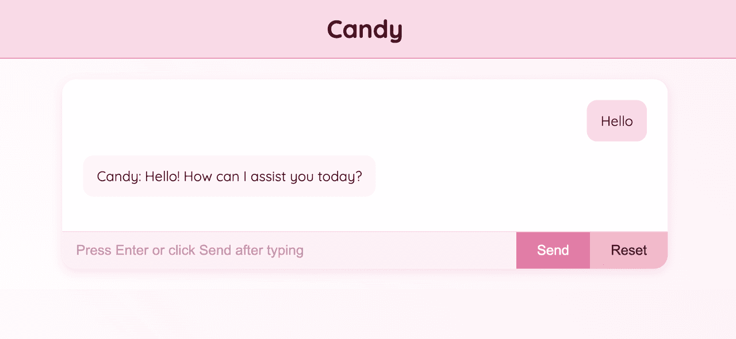
Now we’ve skinned Dify differently and optimized it, creating a rich-featured UI, even adding TTS, making it a semi-voice Chatbot.
OpenAI-Compatible Interface
Users have raised the following questions:
- Dify supports models from multiple vendors; why not use Dify as an API gateway?
- Why can’t Dify’s apps return in OpenAI-compatible formats?
We’ve been monitoring these questions, and while Dify’s API is stateful, allowing more functionality, especially in context management, OpenAI’s stateless API cannot manage contexts as efficiently. Dify controls conversations via conversation_id, whereas OpenAI must carry the full context each time. Additionally, Dify’s API offers more customization and extensibility.
Though we haven’t implemented an OpenAI-compatible interface yet, with the introduction of Endpoints and reverse calls, these functionalities, which would have been tightly coupled with Dify, are now plugins. By developing plugins that call Dify’s LLM, we can meet the need to transform models into OpenAI format or convert Dify API to OpenAI format through plugins to satisfy some user needs.
Implementation
For example, to unify model interfaces, we could set up an Endpoint group as follows:
settings: - name: api_key type: secret-input required: true label: en_US: API key zh_Hans: API key pt_BR: API key placeholder: en_US: Please input your API key zh_Hans: 请输入你的 API key pt_BR: Please input your API key - name: llm type: model-selector scope: llm required: false label: en_US: LLM zh_Hans: LLM pt_BR: LLM placeholder: en_US: Please select a LLM zh_Hans: 请选择一个 LLM pt_BR: Please select a LLM - name: text_embedding type: model-selector scope: text-embedding required: false label: en_US: Text Embedding zh_Hans: 文本嵌入 pt_BR: Text Embedding placeholder: en_US: Please select a Text Embedding Model zh_Hans: 请选择一个文本嵌入模型 pt_BR: Please select a Text Embedding Modelendpoints: - endpoints/llm.yaml - endpoints/text_embedding.yamlAfter completing this, we can select models, like Claude, to transform them into OpenAI interfaces.
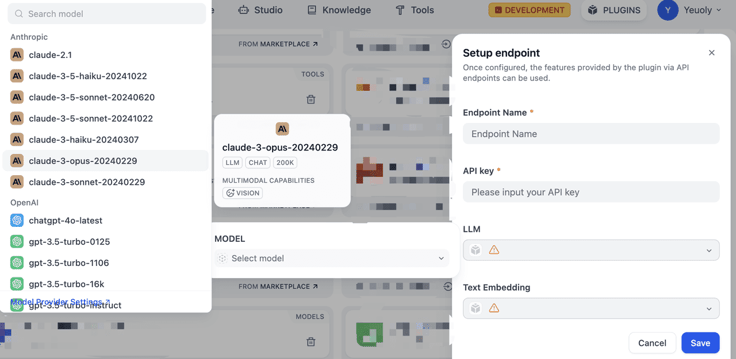
For a simplified pseudocode implementation, the full code can be found here.
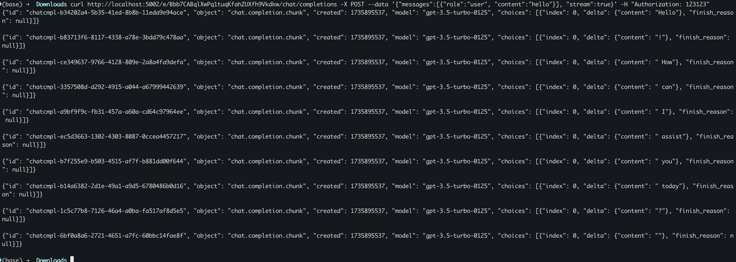
class OaicompatDifyModelEndpoint(Endpoint): def _invoke(self, r: Request, values: Mapping, settings: Mapping) -> Response: """ Invokes the endpoint with the given request. """ llm: Optional[dict] = settings.get("llm") data = r.get_json(force=True) prompt_messages: list[PromptMessage] = [] if not isinstance(data.get("messages"), list) or not data.get("messages"): raise ValueError("Messages is not a list or empty") for message in data.get("messages", []): # transform messages pass tools: list[PromptMessageTool] = [] if data.get("tools"): for tool in data.get("tools", []): tools.append(PromptMessageTool(**tool)) stream: bool = data.get("stream", False) def generator(): if not stream: llm_invoke_response = self.session.model.llm.invoke( model_config=LLMModelConfig(**llm), prompt_messages=prompt_messages, tools=tools, stream=False, ) yield json.dumps({ "id": "chatcmpl-" + str(uuid.uuid4()), "object": "chat.completion", "created": int(time.time()), "model": llm.get("model"), "choices": [{ "index": 0, "message": { "role": "assistant", "content": llm_invoke_response.message.content }, "finish_reason": "stop" }], "usage": { "prompt_tokens": llm_invoke_response.usage.prompt_tokens, "completion_tokens": llm_invoke_response.usage.completion_tokens, "total_tokens": llm_invoke_response.usage.total_tokens } }) else: llm_invoke_response = self.session.model.llm.invoke( model_config=LLMModelConfig(**llm), prompt_messages=prompt_messages, tools=tools, stream=True, ) for chunk in llm_invoke_response: yield json.dumps({ "id": "chatcmpl-" + str(uuid.uuid4()), "object": "chat.completion.chunk", "created": int(time.time()), "model": llm.get("model"), "choices": [{ "index": 0, "delta": {"content": chunk.delta.message.content}, "finish_reason": None }] }) + "\n\n" return Response(generator(), status=200, content_type="event-stream" if stream else "application/json")Finally, we can test the implementation using the curl command:
Asynchronous Event Trigger
The community has frequently requested workflows based on event triggers, with many user scenarios involving asynchronous events. For example, initiate a task, wait for its completion, then trigger a signal to continue the process. Previously, such a need couldn’t be met in Dify, but now with Endpoints, we can break it into two workflows. The first workflow initiates the task and exits normally, and the second workflow receives the Webhook signal to proceed with the subsequent steps.
Although this process isn’t yet intuitive for users, it solves specific problems, like posting AI-generated long-form content for review, with the user accepting it, triggering an event that returns to Dify to complete the publishing process. While this is somewhat complex within the current technical framework, we will introduce direct event-trigger capabilities for workflows in the coming months to further enhance the overall experience.
Related articles
- Product
Dify x Sonilo: Give Your Video Workflows a Licensed Soundtrack
Turn finished videos into soundtracked outputs with Sonilo on Dify. Generate licensed music and sound effects matched to each cut, all within the same workflow.

 Sonilo & Dify
 - Product
From Discovery to Response: A More Connected Dify Marketplace
Good work goes further with better ways to find it, build with it, and share what you learn
 Yajing Wang
 - Product
Why We Redesigned Dify's Agent?
Discover how we redesigned Agent, and how we came to see agents and workflows not as isolated components, but as collaborators that support daily work.
Dify - Product
From Logs to Evidence: Asqav Joins Dify Marketplace to Make Every Agent Action Verifiable
Dify Agents can now produce verifiable, tamper-evident receipts for actions routed through Asqav, our ecosystem partner now live on Dify Marketplace.
 Asqav & Dify