












Building robust AI applications with Dify means navigating complex workflows where individual components (nodes) can encounter issues like API timeouts or unexpected LLM outputs. Previously, a single node failure could disrupt the entire workflow.
Dify's latest update introduces powerful error handling to prevent these cascading failures. This feature not only captures exceptions to maintain workflow execution but also allows developers to define custom error handling for four key node types, enabling detailed debugging and ensuring resilience.
Why Error Handling Matters
Consider a document processing workflow:
- Text is extracted from a PDF.
- An LLM analyzes this text and generates structured data.
- Code processes this data, refining the text.
- The refined text is output.
Without effective error handling, an LLM producing malformed data or a code node encountering an error would stop the workflow. Dify now offers solutions:
- Default Values: Predefined output values allow downstream nodes to continue functioning even with missing, incorrect, or malformed input.
- Workflow Redirection: When exceptions occur, the workflow redirects to an alternative branch, using the
error_typeanderror_messagevariables to capture error details and enable follow-up actions, such as notifications or backup tool activation.
Notably, in parallel workflows, a single branch failure previously halted the entire process. Now, these error handling strategies allow other branches to continue, significantly improving reliability.
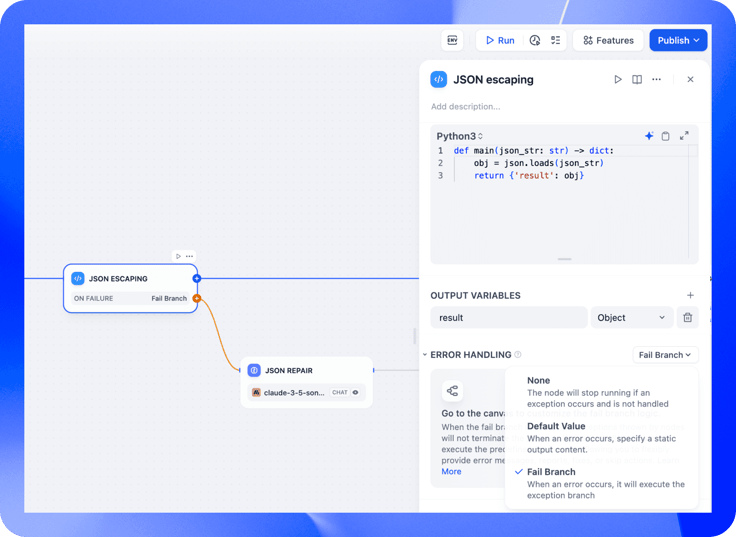
Key Nodes with Error Handling
Dify's advanced error handling targets four error-prone node types:
- LLM Nodes: Handles invalid responses, API issues, and rate limiting. Developers can set default outputs or use conditional branching for alternative solutions.
- HTTP Nodes: Addresses HTTP errors (404, 500, timeouts) with retry intervals and detailed error messages while maintaining workflow execution.
- Tool Nodes: Enables quick switching to backup tools if primary tools fail.
- Code Nodes: Manages runtime errors with predefined values or alternative logic branches, logging error details to prevent disruptions.
A Real-World Error Handling Example
Let's consider a workflow that interacts with an external API. To simulate various HTTP status codes, we'll use the httpstat.us service.
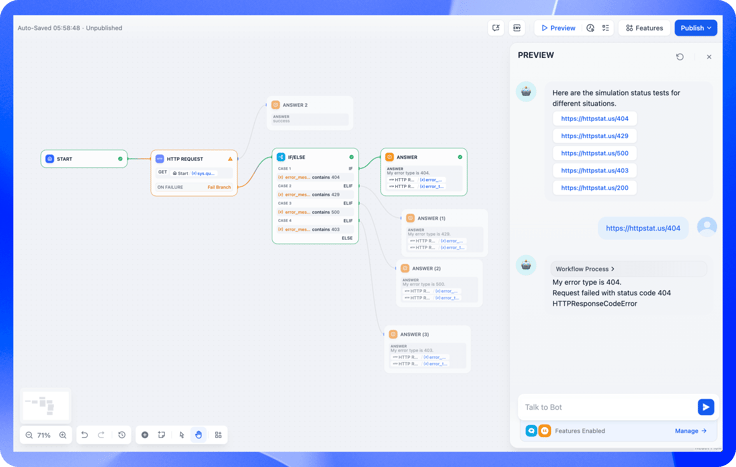
- A Start Node initiates the workflow.
- An HTTP Request Node calls httpstat.us.
- A Fail Branch handles errors.
- Conditional logic responds to specific error codes:
- 403 (Forbidden): Displays a permissions message.
- 404 (Not Found): Logs a "resource not found" message.
- 429 (Too Many Requests): Suggests retrying later.
- 500 (Server Error): Switches to a backup service or triggers an alert.
- Output Nodes generate appropriate responses.
By ensuring workflow stability and providing valuable error feedback, this design enhances the reliability of business operations.
Building More Reliable AI Workflows with Dify
Dify v0.14.0's enhanced error management gives you greater control and flexibility, enabling robust workflows that gracefully handle exceptions and prevent disruptions, ensuring reliable AI applications. Have fun building!
Related articles
- Product
Dify x Sonilo: Give Your Video Workflows a Licensed Soundtrack
Turn finished videos into soundtracked outputs with Sonilo on Dify. Generate licensed music and sound effects matched to each cut, all within the same workflow.

 Sonilo & Dify
 - Product
From Discovery to Response: A More Connected Dify Marketplace
Good work goes further with better ways to find it, build with it, and share what you learn
 Yajing Wang
 - Product
Why We Redesigned Dify's Agent?
Discover how we redesigned Agent, and how we came to see agents and workflows not as isolated components, but as collaborators that support daily work.
Dify - Product
From Logs to Evidence: Asqav Joins Dify Marketplace to Make Every Agent Action Verifiable
Dify Agents can now produce verifiable, tamper-evident receipts for actions routed through Asqav, our ecosystem partner now live on Dify Marketplace.
 Asqav & Dify