










In knowledge base Q&A, user questions generally fall into two categories. The first is specific queries like "What is the return policy?" The second is summarization requests like "Give me the key takeaways from this document."
Traditional chunk-based retrieval handles specific queries well. But it struggles with summarization. The reason is straightforward: once a document is split into independent chunks, each chunk is isolated from the others. Retrieval only returns the single most relevant fragment, leaving the model without enough context to produce a complete answer.
GraphRAG addresses this by building entity relationship graphs, but it comes with significant implementation complexity. Summary Index, introduced in Dify 1.12.0, offers a lighter-weight alternative: by attaching a summary field to each chunk, it enables semantically related content to be retrieved together.
How Summary Index Works
Summary Index adds a summary field to every chunk.
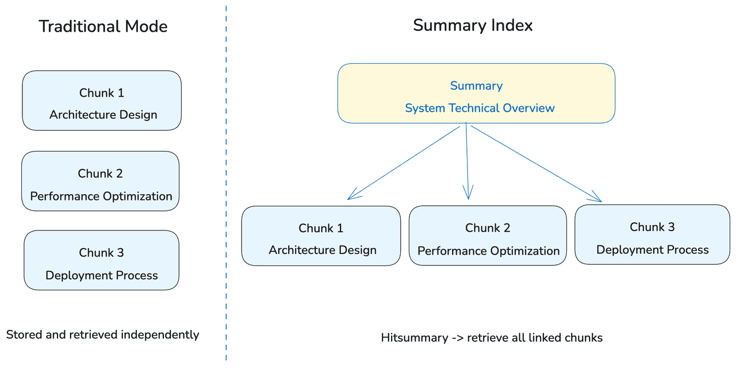
Take a technical document with three chunks covering architecture design, performance optimization, and deployment workflow. Under the traditional approach, these chunks are stored and retrieved independently. With Summary Index, you can assign each chunk the same summary, for example, "System technical solution overview."
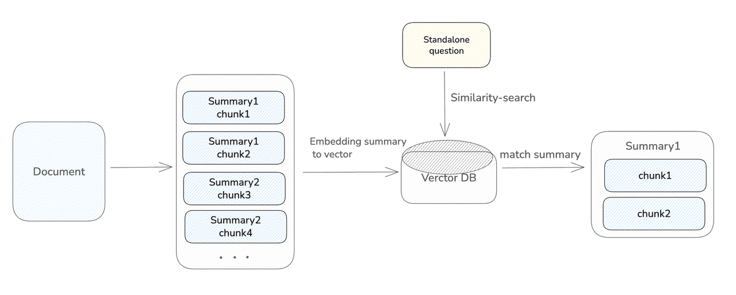
Both chunk content and summary content are vectorized and stored in the database. At query time, the user's question is matched against both. If a chunk is matched directly, that chunk is returned. If a summary is matched, all chunks sharing the same or semantically similar summary are retrieved together. Summarization queries are more likely to match the higher-level language in summaries, which means the model receives fuller context and produces better answers.
How to Add Summaries
Dify provides three ways to attach summaries to chunks.
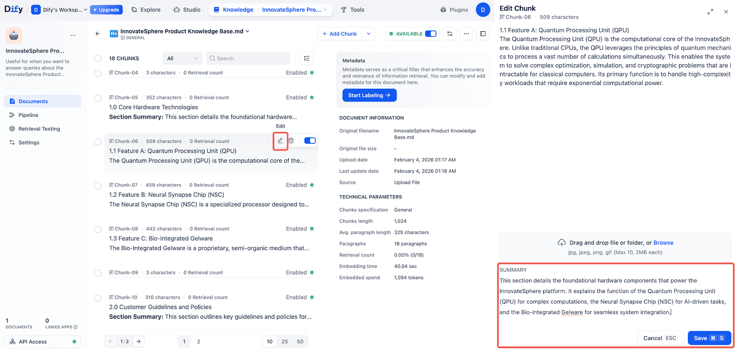
Manual Editing
The chunk list in the Knowledge Base now includes a summary field. You can edit it directly for individual chunks.
API Import
The 1.12.0 Service API supports the summary field. If your documents already contain structured summaries (such as paper abstracts or executive summaries in research reports), you can batch-import them via API and associate each summary with its corresponding chunk.
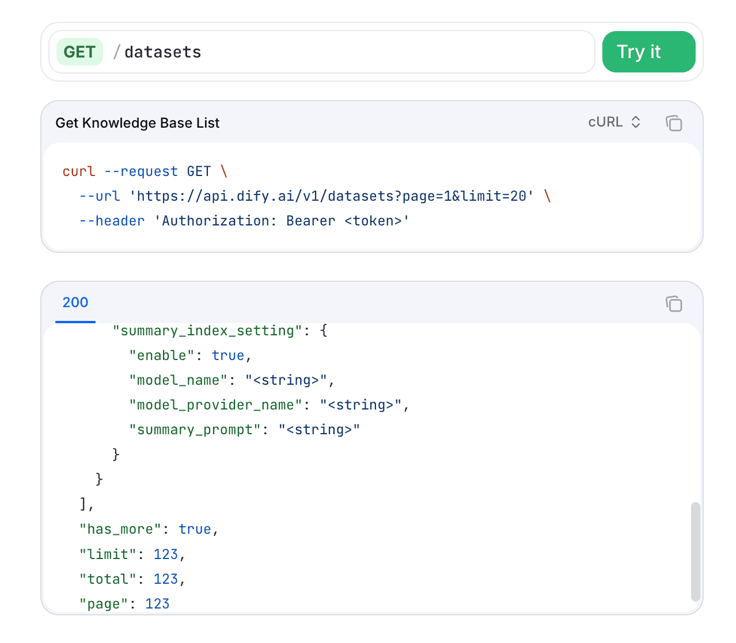
See the API reference: Knowledge Base API Documentation
Auto-generation
Community Edition users can enable the "Auto-generate summary" option when creating a knowledge base. After selecting an LLM model and providing instructions, the system generates a summary for each chunk automatically. For existing knowledge bases, you can select documents from the document list (multi-select is supported) and batch-generate summaries. Since summary quality directly affects retrieval performance, we recommend manually reviewing auto-generated results.
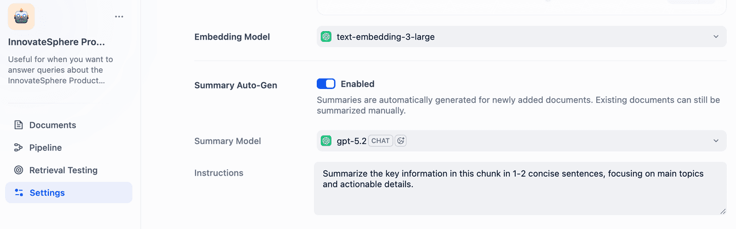
Validation and Integration
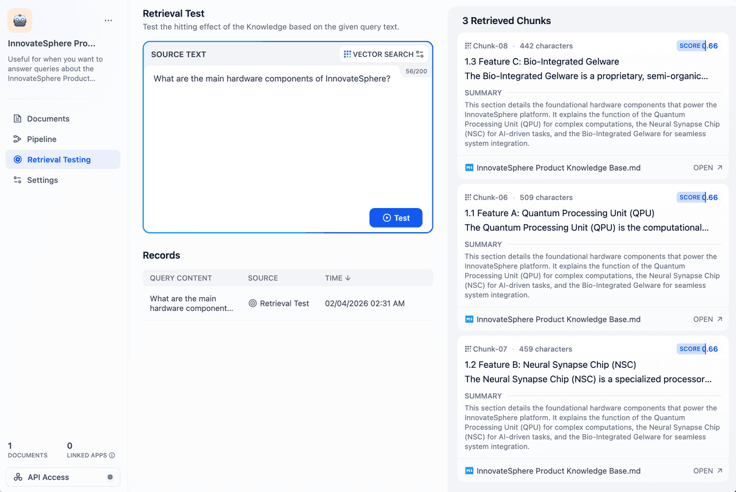
Once configured, use Retrieval Testing in the Knowledge Base to verify that summaries are working as expected.
For example, in a product knowledge base, entering "What are the main hardware components of InnovateSphere?" returned three chunks simultaneously. Each chunk covers a different component (QPU, NSC, and Gelware), but all share the same summary. This confirms the query matched the summary rather than individual chunks. The LLM now has the full picture to work with, reducing incomplete or one-sided answers.
If retrieval results are not what you expected, check whether the summary wording is general enough and whether it is semantically close to the types of queries you anticipate.
In Workflows, the Knowledge Retrieval node also supports Summary Index. When a summary is matched, all associated chunks are returned and can be passed directly to the LLM node as context.
When to Use Summary Index
Documents with Built-in Summaries
Academic papers, industry research reports, and technical white papers typically come with an abstract or executive summary. These can be written directly into the corresponding chunks with almost no extra effort.
Frequent Summarization Queries
When users regularly ask questions like "What are the key takeaways?" or "Can you summarize this?" that require cross-chunk answers, Summary Index significantly improves response quality.
Teams Committed to Data Curation
Summaries need to be written or reviewed by a human. If your team values knowledge base quality, Summary Index provides a new dimension for optimization.
Final Thoughts
One of the core challenges in knowledge base retrieval is preserving the semantic connections between content sections after a document is split. Summary Index offers a lightweight solution: without changing the chunking logic, it adds a summary layer on top of chunks so that related content can be reassembled at retrieval time.
Summary Index is available now in Dify 1.12.0. Read the full documentation for setup details: Summary Index Documentation
Add summary fields to your chunks and improve how your AI handles summarization queries.
Related articles
- Release
Introducing New Agent
Build agents by chatting. Dify automatically generated reusable skills and preserves the context during the conversation. When it's ready, add it into the workflow for a bigger process.
 Zhenan Sun
 - Release
Dify's Official CLI: difyctl Ships
Dify introduces CLI access, making it easy for Agents to call Dify apps with a single command.
Zhenan Sun - Release
Build · Share · Earn: Dify Creator Center And Template Marketplace Are Now Live
A unified platform for creators to publish and for users to discover, enabling workflows to be quickly reused and adopted at scale.
Zhenan Sun - Release
Dify 1.14.1: Workflows Become a Team Asset
Move workflows from “built” to “continuously used and reused,” so AI can fit into enterprise processes.
 Dify
Dify