












ArkSim is an open-source agent testing framework built by Arklex AI that generates synthetic users and runs them against your agent in realistic multi-turn conversations. We tested the Dify x ArkSim integration and found it connects directly to Dify's Chat API via a lightweight adapter, with no SDK dependency. Together, Dify handles everything from workflow design to deployment, and ArkSim handles systematic validation before your real users do it for you.
Architecture: how Dify and ArkSim work together
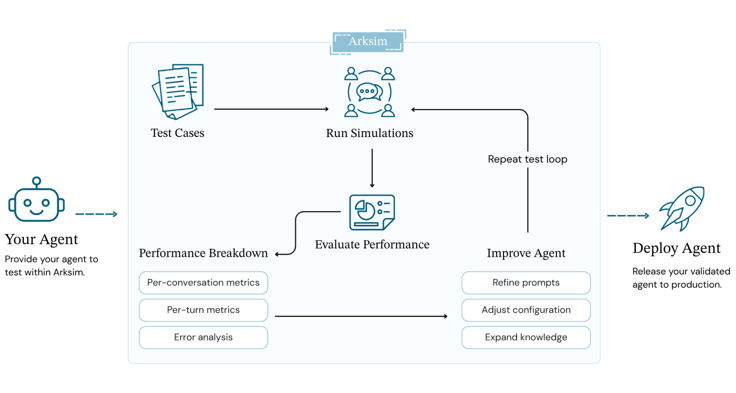
The two tools occupy complementary layers of the stack.
Dify handles the full application layer: visual workflow orchestration, RAG knowledge pipeline, LLM routing, conversation variable management, and API exposure. You build and iterate your AI application entirely within Dify, from prompt design to knowledge base configuration to deployment.
ArkSim sits outside that stack as a test harness. It drives multi-turn conversations against your Dify app through the Chat API and evaluates the results. It never touches Dify's internals and only sees what a real user would see.
The connection between them is a thin adapter that wraps Dify's Chat API endpoint. The adapter preserves conversation_id across turns so that Dify's conversation memory stays intact during simulation. This is what makes it possible to test multi-turn context handling rather than a series of isolated single exchanges.
ArkSim
└── Synthetic user (LLM-powered, with persona + goal)
└── DifyAgent adapter
└── Dify Chat API ──→ Your workflow
├── RAG knowledge base
├── LLM node
└── Conversation variables
Implementation steps
1. Install ArkSim
pip install arksim
export OPENAI_API_KEY="your-key"
ArkSim uses OpenAI (or Anthropic/Google, with optional extras) as the evaluation LLM, the model that plays the synthetic user and scores responses. This is separate from whatever LLM your Dify workflow uses.
2. Get your Dify app credentials
In the Dify dashboard, open your app and go to API Access. You need two things:
- API URL - typically
https://api.dify.ai/v1for Dify Cloud, or your self-hosted instance URL - API Key - the app's secret key shown in the API Access panel
3. Create the Dify adapter
The integration example lives at examples/integrations/dify in the ArkSim repo. The core adapter implements ArkSim's BaseAgent interface:
import httpx
from arksim.agents import BaseAgent
class DifyAgent(BaseAgent):
def __init__(self, api_url: str, api_key: str):
self.api_url = api_url
self.api_key = api_key
self.conversation_id = None
def chat(self, message: str) -> str:
payload = {
"inputs": {},
"query": message,
"response_mode": "blocking",
"user": "arksim-test-user",
}
if self.conversation_id:
payload["conversation_id"] = self.conversation_id
response = httpx.post(
f"{self.api_url}/chat-messages",
headers={"Authorization": f"Bearer {self.api_key}"},
json=payload,
timeout=30,
)
data = response.json()
self.conversation_id = data.get("conversation_id")
return data["answer"]
The key detail is the conversation_id threading. On the first turn it is None, so Dify creates a new conversation. Every subsequent turn passes the ID back, which keeps Dify's conversation memory active across the full simulated exchange. Without this, each turn would be stateless and you would never catch multi-turn failures.
4. Define your scenarios
Scenarios are where you specify who the synthetic user is and what they are trying to do. Save them as scenarios.json:
[
{
"name": "new_user_onboarding",
"persona": "A non-technical user who just signed up and is trying to complete their first task. They are patient but easily confused by jargon.",
"goal": "Understand how to set up their account and complete the onboarding checklist.",
"prior_knowledge": "They know what the product does at a high level but have not read the documentation.",
"max_turns": 8
},
{
"name": "frustrated_refund_request",
"persona": "A customer who made a purchase two weeks ago and believes the product is defective. They are frustrated and want a resolution quickly.",
"goal": "Find out whether they qualify for a refund and what the process is.",
"prior_knowledge": "They know they made a purchase. They do not know the return policy or timeline.",
"max_turns": 7
},
{
"name": "technical_edge_case",
"persona": "An experienced developer evaluating the product for enterprise use. They ask precise follow-up questions and will probe for inconsistencies.",
"goal": "Understand the API rate limits, data retention policy, and SLA guarantees.",
"prior_knowledge": "They have read the public documentation but want to verify specific details.",
"max_turns": 10
}
]
The persona and goal fields drive how the synthetic user behaves throughout the conversation. They are not a fixed script; they are a character the LLM plays. This is why ArkSim catches phrasing variations and follow-up patterns that hand-written test cases miss.
5. Configure ArkSim
Create config.yaml in the same directory:
agent:
type: python
module: dify_agent
class: DifyAgent
args:
api_url: "${DIFY_API_URL}"
api_key: "${DIFY_API_KEY}"
scenarios: scenarios.json
evaluation:
metrics:
- helpfulness
- faithfulness
- coherence
- goal_completion
min_score: 0.75
Environment variable substitution keeps credentials out of the config file.
6. Run the simulation
export DIFY_API_URL="https://api.dify.ai/v1"
export DIFY_API_KEY="your-dify-app-key"
arksim simulate-evaluate config.yaml
ArkSim runs each scenario as a full multi-turn conversation against your Dify app, then evaluates every turn. Depending on the number of scenarios and max_turns, a typical run takes 2 to 5 minutes.
When it finishes, it prints a summary to the terminal and opens an interactive report in the browser. The report shows per-scenario scores broken down by metric, agent behavior failures categorized by type (context loss, contradiction, off-topic, and others), and full conversation transcripts with per-turn annotations so you can read the exact exchange where the score dropped.
This is where the real debugging value is. A score like "faithfulness: 0.61 on frustrated_refund_request" tells you something is wrong. The transcript shows you which turn the agent started hallucinating policy details that are not in your knowledge base.
Application paths
Iterating on your Dify workflow
The most immediate use is as a feedback loop during development. When you update a prompt node, add documents to your knowledge base, or restructure a workflow branch in Dify, run ArkSim against your scenario set before shipping. You get a concrete before/after comparison on agent behavior rather than a manual spot-check.
CI quality gate
Once you have a baseline score you are comfortable with, add ArkSim as a CI check. A minimal GitHub Actions step looks like this:
- name: Simulate and evaluate Dify agent
run: |
pip install arksim
arksim simulate-evaluate config.yaml
env:
OPENAI_API_KEY: ${{ secrets.OPENAI_API_KEY }}
DIFY_API_URL: ${{ secrets.DIFY_API_URL }}
DIFY_API_KEY: ${{ secrets.DIFY_API_KEY }}
Setting min_score: 0.75 in config.yaml causes the command to exit non-zero if the average score falls below threshold, blocking the merge. You can also set per-metric floors, for example requiring faithfulness >= 0.85 if your agent operates in a domain where hallucination carries real risk.
Knowledge base regression testing
One pattern that works especially well with Dify: run ArkSim automatically whenever your knowledge base is updated. Dify's RAG pipeline is sensitive to chunk strategy, embedding model, and retrieval settings. A knowledge base update that looks harmless can silently change what the agent retrieves and says. A scenario set that covers your main user intents gives you immediate signal when that happens.
Getting started
Clone the ArkSim repo and go straight to the Dify integration example:
pip install arksim
git clone https://github.com/arklexai/arksim.git
cd arksim/examples/integrations/dify
Edit config.yaml with your Dify API URL and key, then run:
arksim simulate-evaluate config.yaml
You will have your first simulation report in under ten minutes.
Full documentation is at docs.arklex.ai. Questions and contributions are welcome on GitHub.
If you have questions about building your Dify workflow or configuring your knowledge base for better test coverage, join the Dify Discord community.
About Arklex
Arklex helps enterprises and developers evaluate, test, and govern conversational AI agents before they reach production. Built around the belief that AI agents should be proven ready, not assumed ready. Arklex provides the tooling and infrastructure teams need to simulate realistic user interactions, measure performance at every turn, and ship with confidence.
For developers, Arklex offers ArkSim, a free and open-source testing framework that simulates realistic multi-turn conversations with any AI agent and evaluates performance across built-in and custom metrics. With a simple CLI and zero infrastructure setup, ArkSim lets engineering teams catch failures before users do.
For teams that need more, Arklex Platform is the hosted SaaS product built on top of ArkSim, bringing advanced scenario generation, collaborative workspaces, longitudinal quality tracking, and enterprise-grade governance to the full agent testing lifecycle. No local configuration required.
Website | Github | Docs | X | LinkedIn
About Dify
Dify is an open-source, production-ready platform for building agentic AI applications. It empowers enterprises and developers to rapidly build, deploy, and operate generative AI applications through an intuitive low-code interface.
As of May 2026, Dify has surpassed 142k stars on GitHub, establishing itself as one of the most recognized open-source generative AI projects in the world.
Built around core capabilities including workflow orchestration, agent frameworks, data management, and model integration, Dify significantly lowers the barrier to adopting advanced AI technologies. Whether you're an independent developer or part of a large organization, Dify enables teams to harness generative AI in a more cost-effective and sustainable way, driving scalable value across operational automation, knowledge services, customer support, and intelligent analytics.
Related articles
- Developer
Deploying Private AI Agents with Dify on NVIDIA DGX Spark
This solution provides a complete hardware-to-application stack for building enterprise-grade private AI agents locally.
 Dify
Dify - Developer
How to run open source model Gemma on Dify?
Explore how to leverage Google's Gemma, an open-source LLM, for integration with Dify. Discover tips for enhancing AI applications responsibly.
 Xiaoyi
 - Developer
Dify.AI: Open-source Assistants API based on any LLM
OpenAI's Assistants API marks a shift in application engineering towards advanced AI use, emphasizing orchestration services. Dify, an open-source leader in this field, offers self-hosting for data security, multi-model support, and a flexible RAG engine. It enables privacy, compliance, customizable data processing, and team collaboration, enhancing AI application development and integration.
Dify - Developer
Introducing Hybrid Search and Rerank to Improve the Retrieval Accuracy of the RAG System
This article discusses enhancing RAG systems with Hybrid Search and Rerank technologies, focusing on improving retrieval accuracy and efficiency using LLMs for more comprehensive and precise search results.
 Vince
Vince